
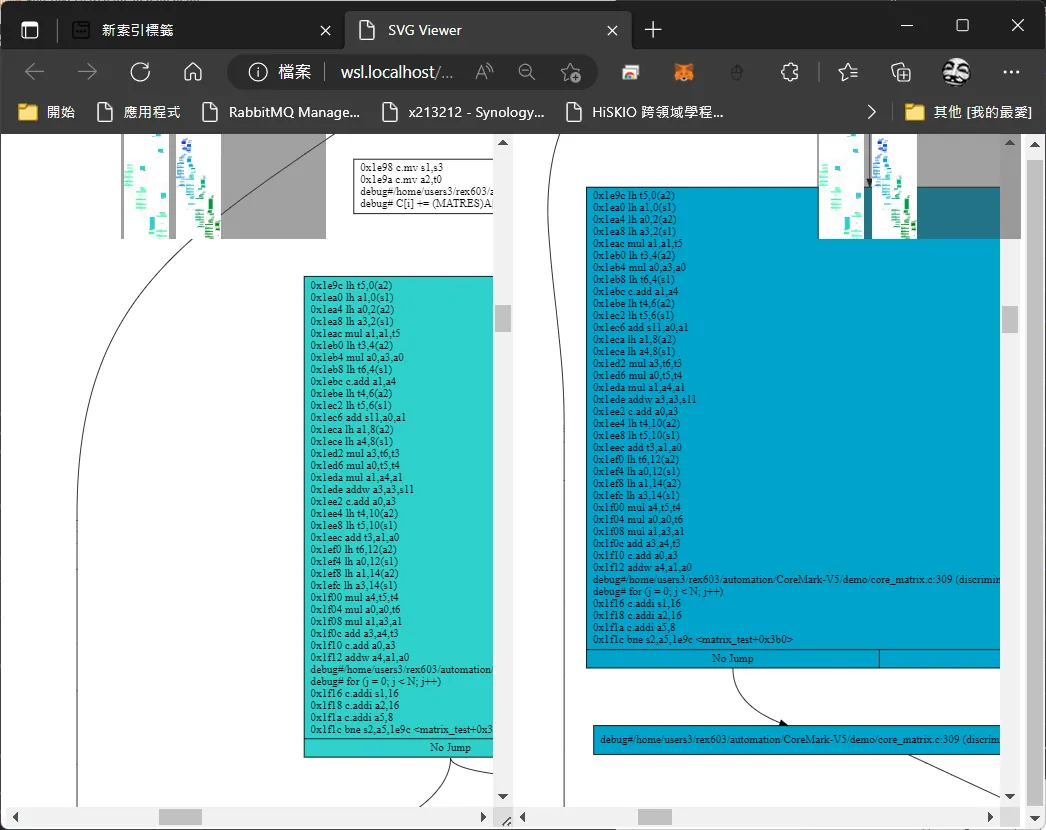
riscv asm compare viewer
既然能輸出svg向量檔,那麼對比當中的html是否有更方便的方式呢,來寫個html,主要對照vscode可以實現拖拉載入svg圖檔,以及卷軸同步功能,以便找出asm的不同.
<!DOCTYPE html>
<html lang="en">

<head>
    <meta charset="UTF-8">
    <meta http-equiv="X-UA-Compatible" content="IE=edge">
    <meta name="viewport" content="width=device-width, initial-scale=1.0">
    <title>SVG Viewer</title>
</head>

<body>

    <div id="app">
        <div class="scroll-left" id="left">

            <div class="drop-zone"><span>圖檔拖放區</span></div>
            <div data-bind="foreach: images" class="img-list">
                <img data-bind="attr: { src: dataUri }, click: $root.currImage" class="thumbnail" />
            </div>
            <fieldset class="display" data-bind="with: currImage">

                <legend>
                    <div class="center">
                        <span style="font-size:50px;" data-bind="text: name"></span>
                        </br>
                        <span style="font-size:50px;" data-bind=" text: size"></span>
                        </div>
                </legend>
                <object data-bind="attr: { data: dataUri }" type="image/svg+xml"></object>
            </fieldset>
        </div>
        <div class="scroll-right" id="right">

            <div class="drop-zone2"><span>圖檔拖放區</span></div>

            <div data-bind="foreach: images" class="img-list2">
                <img data-bind="attr: { src: dataUri }, click: $root.currImage2" class="thumbnail" />
            </div>
            <fieldset class="display2" data-bind="with: currImage2">

                <legend>
                    <div class="center">
                    <span style="font-size:50px;" data-bind="text: name"></span>
                    </br>
                    <span style="font-size:50px;" data-bind=" text: size"></span>
                    </div>
                </legend>

                <object data-bind="attr: { data: dataUri }" type="image/svg+xml"></object>

            </fieldset>

        </div>
    </div>
    <script src="http://ajax.aspnetcdn.com/ajax/jQuery/jquery-1.9.1.js "></script>
    <script src="http://ajax.aspnetcdn.com/ajax/knockout/knockout-3.0.0.js "></script>
    <script src="http://cdn.kendostatic.com/2013.3.1119/js/kendo.core.min.js"></script>
    <script>
        $(function () {
            var $drop = $(".drop-zone");
            var $drop2 = $(".drop-zone2");
            //抑制瀏覽器原有的拖拉操作效果
            function stopEvent(evt) {
                evt.stopPropagation();
                evt.preventDefault();
            }
            $drop.bind("dragover", function (e) {
                //滑鼠經過上方時加入特效
                stopEvent(e);
                $(e.target).addClass("hover");
            }).bind("dragleave", function (e) {
                //滑鼠移開時移除特效
                stopEvent(e);
                $(e.target).removeClass("hover");
            }).bind("drop", function (e) {
                //拖放操作完成事件
                stopEvent(e);
                $(e.target).removeClass("hover");
                //由dataTransfer.files取得檔案資訊
                var files = e.originalEvent.dataTransfer.files;
                var imageFiles = $.map(files, function (f, i) {
                    //只留下type為image/*者,例如: image/gif, image/jpeg, image/png...
                    return f.type.indexOf("image") == 0 ? f : null;
                });
                //清除ViewModel
                vm.images.removeAll(); vm.currImage(null);
                //逐一讀入各圖檔,取得DataURI,顯示在網頁上
                $.each(imageFiles, function (i, file) {
                    //使用File API讀取圖檔內容轉為DataUri
                    var reader = new FileReader();
                    reader.onload = function (e) {
                        //將檔名、檔案大小、DataURI放入ViewModel
                        vm.images.push({
                            name: file.name,
                            size: kendo.format("{0:n0} bytes", file.size),
                            dataUri: e.target.result
                        })
                    }
                    reader.readAsDataURL(file);
                });
            });
            $drop2.bind("dragover", function (e) {
                //滑鼠經過上方時加入特效
                stopEvent(e);
                $(e.target).addClass("hover");
            }).bind("dragleave", function (e) {
                //滑鼠移開時移除特效
                stopEvent(e);
                $(e.target).removeClass("hover");
            }).bind("drop", function (e) {
                //拖放操作完成事件
                stopEvent(e);
                $(e.target).removeClass("hover");
                //由dataTransfer.files取得檔案資訊
                var files = e.originalEvent.dataTransfer.files;
                var imageFiles = $.map(files, function (f, i) {
                    //只留下type為image/*者,例如: image/gif, image/jpeg, image/png...
                    return f.type.indexOf("image") == 0 ? f : null;
                });
                //清除ViewModel
                vm2.images.removeAll(); vm2.currImage2(null);
                //逐一讀入各圖檔,取得DataURI,顯示在網頁上
                $.each(imageFiles, function (i, file) {
                    //使用File API讀取圖檔內容轉為DataUri
                    var reader = new FileReader();
                    reader.onload = function (e) {
                        //將檔名、檔案大小、DataURI放入ViewModel
                        vm2.images.push({
                            name: file.name,
                            size: kendo.format("{0:n0} bytes", file.size),
                            dataUri: e.target.result
                        })
                    }
                    console.log()
                    reader.readAsDataURL(file);
                });
            });
            function myViewModel() {
                var self = this;
                self.images = ko.observableArray();
                self.currImage = ko.observable();
                self.currImage2 = ko.observable();
            }
            var vm = new myViewModel();
            ko.applyBindings(vm);
        });

    </script>
</body>

<script>

    let left = document.getElementById('left');
    let right = document.getElementById("right");
    left.onscroll = (e) => {
        right.scrollTop = e.target.scrollTop;
        right.scrollLeft = e.target.scrollLeft;
    }
    left.on({
        "dragover": function (event) {
            event.preventDefault();
        },
        "drop": function (event) {
            let file = event.originalEvent.dataTransfer.files[0];
            event.preventDefault();
            event.stopPropagation();
            console.log(file)
        }
    })
</script>

<style scoped>
    #app {

        display: flex;
    }

    .scroll-left,
    .scroll-right {
        width: 60%;
        height: 100vh;
    }

    .tleft {
        margin-right: 10px;
    }

    .scroll-left {
        background-color: antiquewhite;
        overflow: auto;
        resize: horizontal;
    }

    .scroll-right {
        background-color: #c3faff;
        overflow: auto;
    }

    .item {
        height: 200px;
        width: 90%;
        margin-bottom: 50px;
    }

    .scroll-left .item {
        background-color: brown;
    }

    .scroll-right .item {
        background-color: coral;
    }

    .drop-zone {
        /* position: absolute; */
        top: 6px;
        width: 180px;
        height: 180px;
        font-size: 30px;

        /* background-color: green; */
        color: rgb(0, 0, 0);
        text-align: center;
        background-color: rgba(100, 255, 216, 0.3);
    }

    .drop-zone2 {
        /* position: absolute; */
        top: 6px;
        font-size: 30px;
        width: 180px;
        height: 180px;
        color: rgb(0, 0, 0);
        text-align: center;
        background-color: rgba(100, 255, 216, 0.3);
    }

    .drop-zone.hover {
        background-color: blue;
    }

    .drop-zone2.hover {
        background-color: blue;
    }

    .img-list {
        position: absolute;
        height: 180px;
        background-color: rgba(68, 68, 68, 0.5);
        /* background-color: #444; */
        top: 6px;
        left: 200px;

        right: 6px;
        overflow-y: hidden;
        overflow-x: auto;
        white-space: nowrap;
        width: 20%;
    }

    .img-list2 {
        position: absolute;
        height: 180px;
        background-color: rgba(68, 68, 68, 0.5);
        top: 6px;
        margin-left: auto;
        right: 6px;
        overflow-y: hidden;
        overflow-x: auto;
        white-space: nowrap;
        width: 20%;
    }

    .thumbnail {
        max-width: 100px;
        max-width: 75px;
        vertical-align: top;
        margin: 3px;
        cursor: pointer;
        border: 1px solid transparent;
    }

    .thumbnail:hover {
        border: 1px solid red;
    }

    .display {
        top: 110px;
        width: 60%;
        height: 100vh;
        border-width: 0px;
    }

    .display2 {
        top: 110px;
        width: 60%;
        height: 100vh;
        border-width: 0px;
    }

    .center {
        margin: auto;
        width: 20%;

        padding: 10px;
    }
</style>

</html>
Comments