
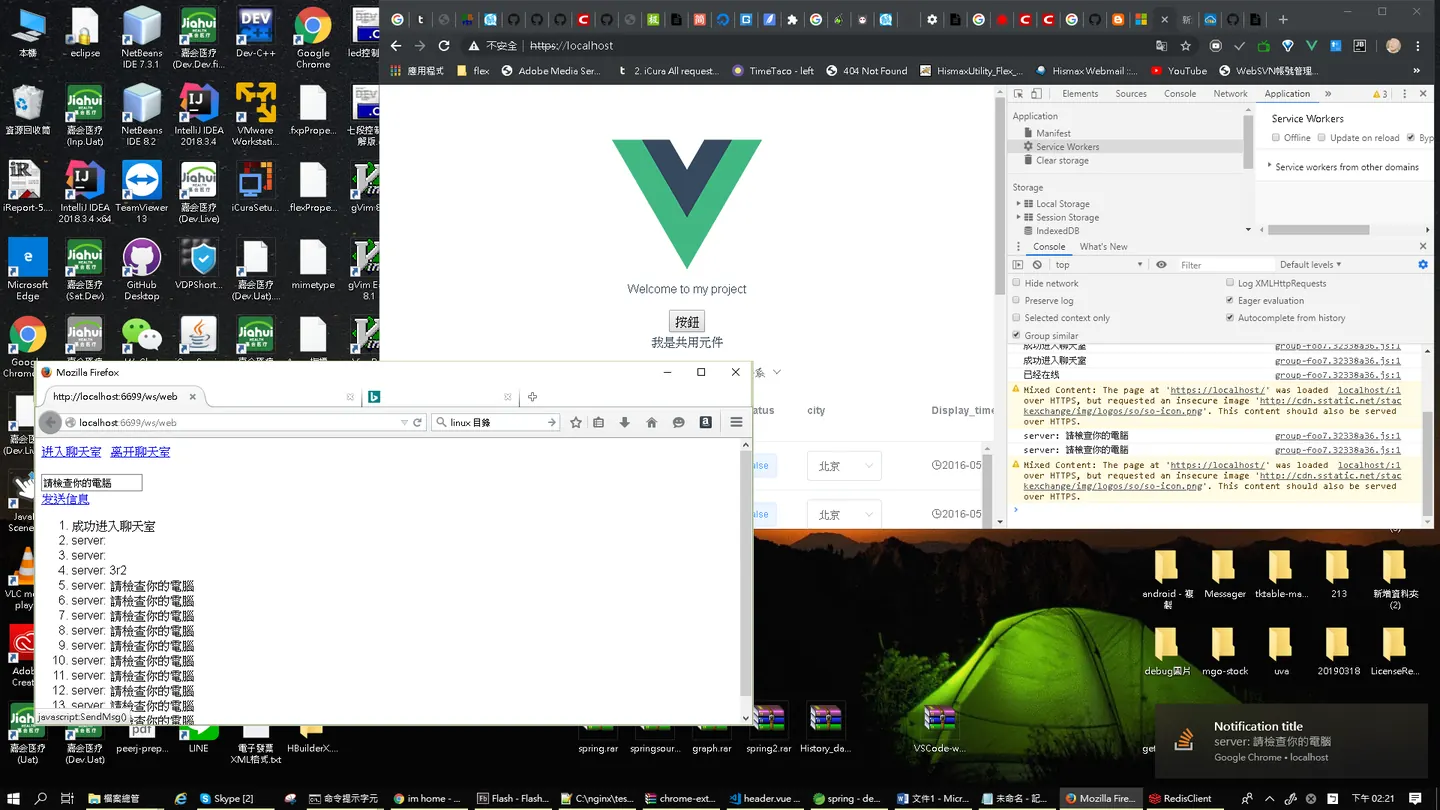
一開始本來打算使用 firebase. 去做推送server,後來發現這項技術,在大陸地區訪問google 或是 其他服務是很有問題的xd 這邊我們才用websocket來實現
為什麼要用websocket?
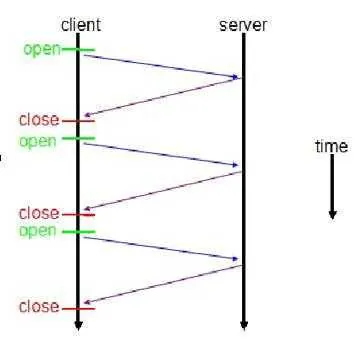
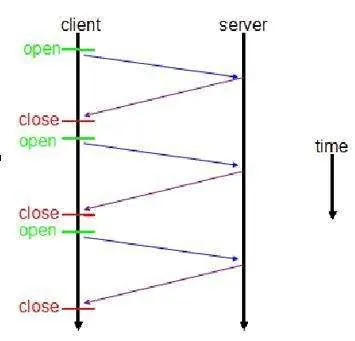
传统HTTP客户端与服务器请求响应模式如下图所示:
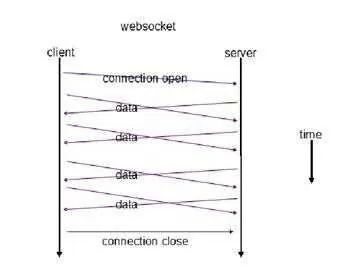
WebSocket模式客户端与服务器请求响应模式如下图:
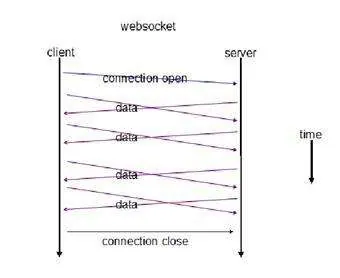
https://blog.csdn.net/orangleliu/article/details/50898014 ,接下來就是客製化細部微調羅
B/S結構的軟體項目中有時客戶端需要實時的獲得伺服器消息,但默認HTTP協議只支持請求響應模式,這樣做可以簡化Web伺服器,減少伺服器的負擔,加快響應速度,因為伺服器不需要與客戶端長時間建立一個通信連結,但不容易直接完成實時的消息推送功能,如聊天室、後台信息提示、實時更新數據等功能,但通過polling、Long polling、長連接、Flash Socket以及HTML5中定義的WebSocket能完成該功能需要。 一、Socket簡介 Socket又稱"套接字",應用程式通常通過"套接字"向網絡發出請求或者應答網絡請求。Socket的英文原義是「孔」或「插座」,作為UNIX的進程通信機制。Socket可以實現應用程式間網絡通信。
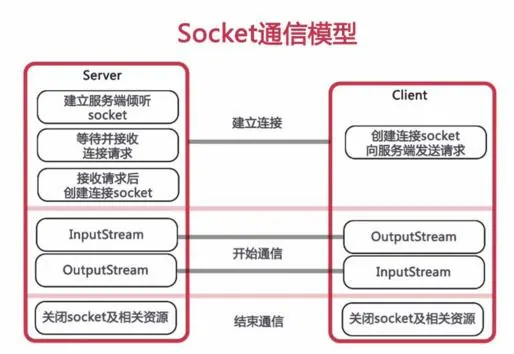
Socket可以使用TCP/IP協議或UDP協議。 TCP/IP協議 TCP/IP協議是目前應用最為廣泛的協議,是構成Internet國際網際網路協議的最為基礎的協議,由TCP和IP協議組成: TCP協議:面向連接的、可靠的、基於字節流的傳輸層通信協議,負責數據的可靠性傳輸的問題。 IP協議:用於報文交換網絡的一種面向數據的協議,主要負責給每台網絡設備一個網絡地址,保證數據傳輸到正確的目的地。 UDP協議 UDP特點:無連接、不可靠、基於報文的傳輸層協議,優點是發送後不用管,速度比TCP快。 二、WebSocket簡介與消息推送 B/S架構的系統多使用HTTP協議,HTTP協議的特點: 1 無狀態協議 2 用於通過 Internet 發送請求消息和響應消息 3 使用埠接收和發送消息,默認為80埠 底層通信還是使用Socket完成。
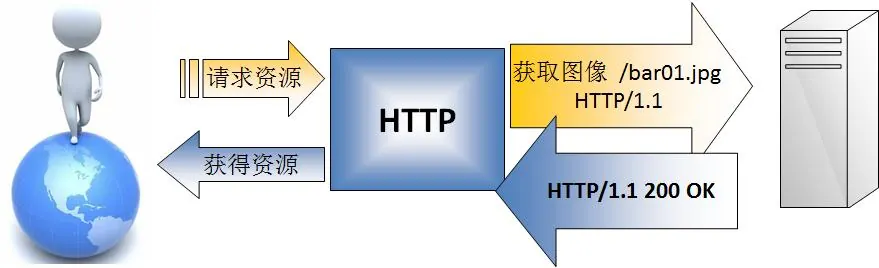
HTTP協議決定了伺服器與客戶端之間的連接方式,無法直接實現消息推送(F5已壞),一些變相的解決辦法: 雙向通信與消息推送 輪詢:客戶端定時向伺服器發送Ajax請求,伺服器接到請求後馬上返迴響應信息並關閉連接。 優點:後端程序編寫比較容易。 缺點:請求中有大半是無用,浪費帶寬和伺服器資源。 實例:適於小型應用。 長輪詢:客戶端向伺服器發送Ajax請求,伺服器接到請求後hold住連接,直到有新消息才返迴響應信息並關閉連接,客戶端處理完響應信息後再向伺服器發送新的請求。 優點:在無消息的情況下不會頻繁的請求,耗費資小。 缺點:伺服器hold連接會消耗資源,返回數據順序無保證,難於管理維護。 Comet異步的ashx,實例:WebQQ、Hi網頁版、Facebook IM。 長連接:在頁面里嵌入一個隱蔵iframe,將這個隱蔵iframe的src屬性設為對一個長連接的請求或是採用xhr請求,伺服器端就能源源不斷地往客戶端輸入數據。 優點:消息即時到達,不發無用請求;管理起來也相對便。 缺點:伺服器維護一個長連接會增加開銷。 實例:Gmail聊天 Flash Socket:在頁面中內嵌入一個使用了Socket類的 Flash 程序JavaScript通過調用此Flash程序提供的Socket接口與伺服器端的Socket接口進行通信,JavaScript在收到伺服器端傳送的信息後控制頁面的顯示。 優點:實現真正的即時通信,而不是偽即時。 缺點:客戶端必須安裝Flash插件;非HTTP協議,無法自動穿越防火牆。 實例:網絡互動遊戲。 Websocket: WebSocket是HTML5開始提供的一種瀏覽器與伺服器間進行全雙工通訊的網絡技術。依靠這種技術可以實現客戶端和伺服器端的長連接,雙向實時通信。 特點: 事件驅動 異步 使用ws或者wss協議的客戶端socket 能夠實現真正意義上的推送功能 缺點: 少部分瀏覽器不支持,瀏覽器支持的程度與方式有區別。
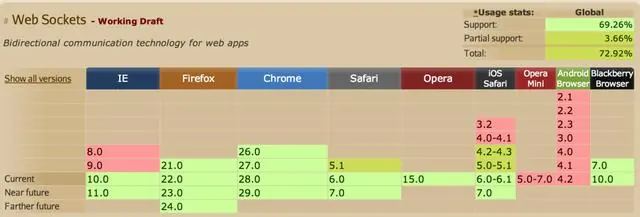
websocket 打造推播
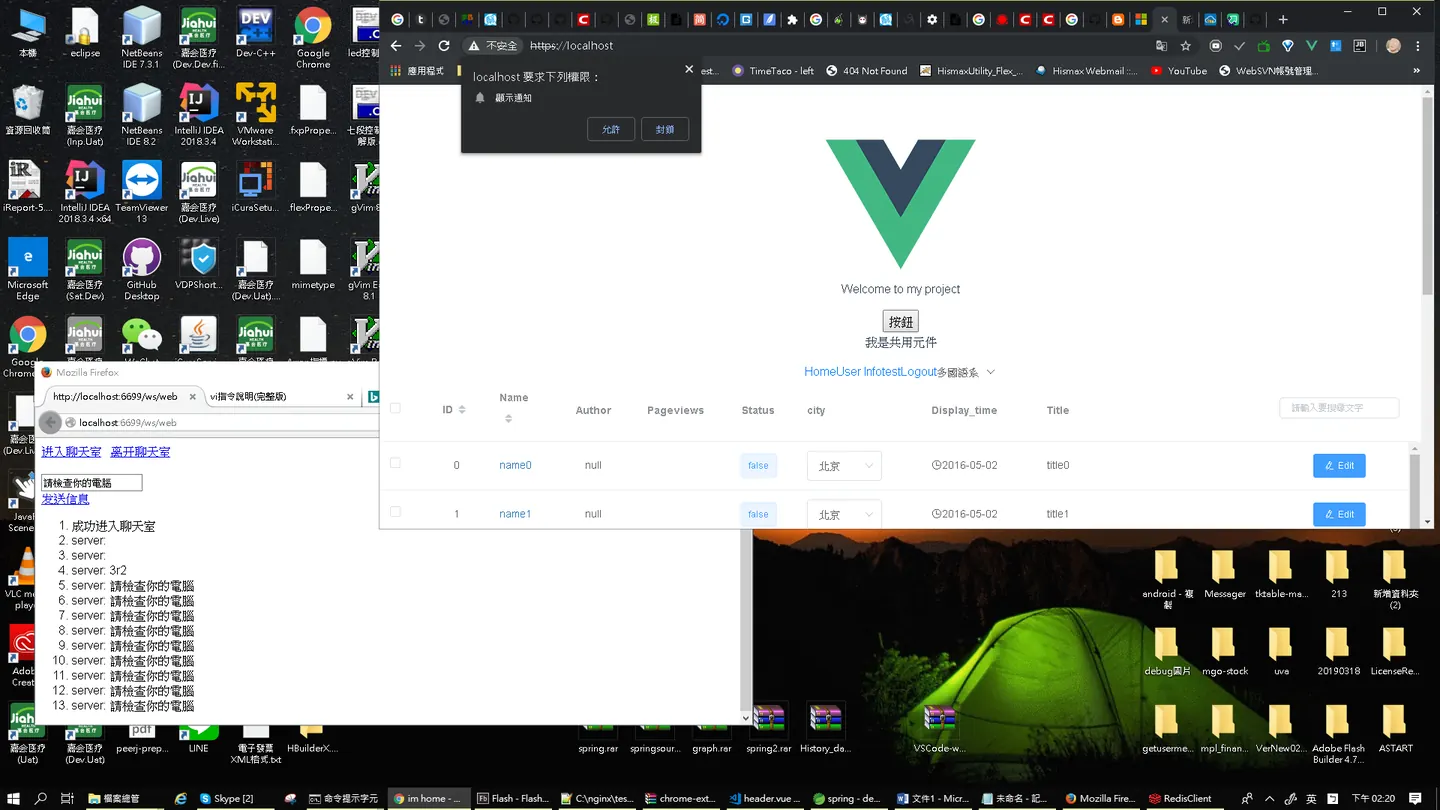
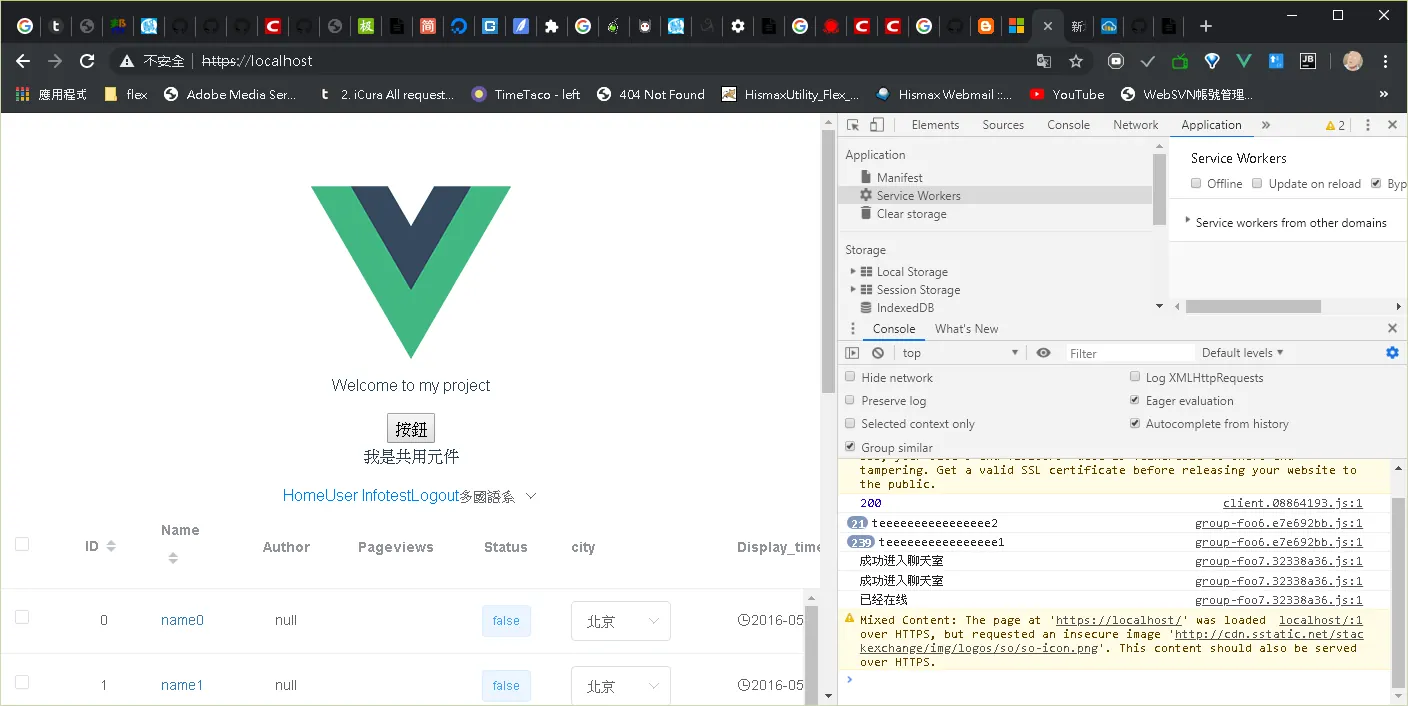
lua.conf
server {
    listen  6699;
    location /lua {
        default_type text/html;
        lua_code_cache off;
        content_by_lua_file /home/x213212/openresty-test/conf/lua/test.lua;
    }
    location = /sredis {
        content_by_lua_file /home/x213212/openresty-test/conf/lua/ws_redis.lua;
    }

    location ~ /ws/(.*) {
        alias /home/x213212/openresty-test/conf/html/$1.html;
    }
}
nginx.conf
user root;
worker_processes  1;        #nginx worker 数量
error_log logs/error.log;   #指定错误日志文件路径
events {
    worker_connections 1024;
}

http {
        default_type  text/html;
        lua_package_path "/home/x213212/openresty/lualib/?.lua;;";
        lua_package_cpath "/home/x213212/openresty/lualib/?.so;;";
        include lua.conf;

}
test.lua
ngx.say("hello world");
ngx.say("test2");
web.html
<!DOCTYPE HTML>
<html>
<head>
<meta charset="utf-8">
<meta name="viewport" content="width=device-width, initial-scale=1.0, user-scalable=no">
<script type="text/javascript">
var ws = null;
function WebSocketConn() {
if (ws != null && ws.readyState == 1) {
log("已经在线");
return
}
if ("WebSocket" in window) {
// Let us open a web socket
ws = new WebSocket("ws://localhost:6699/sredis");
ws.onopen = function() {
log('成功进入聊天室');
};
ws.onmessage = function(event) {
log(event.data)
};
ws.onclose = function() {
// websocket is closed.
log("已经和服务器断开");
};
ws.onerror = function(event) {
console.log("error " + event.data);
};
} else {
// The browser doesn't support WebSocket
alert("WebSocket NOT supported by your Browser!");
}
}
function SendMsg() {
if (ws != null && ws.readyState == 1) {
var msg = document.getElementById('msgtext').value;
ws.send(msg);
} else {
log('请先进入聊天室');
}
}
function WebSocketClose() {
if (ws != null && ws.readyState == 1) {
ws.close();
log("发送断开服务器请求");
} else {
log("当前没有连接服务器")
}
}
function log(text) {
var li = document.createElement('li');
li.appendChild(document.createTextNode(text));
document.getElementById('log').appendChild(li);
return false;
}
</script>
</head>
<body>
<div id="sse">
<a href="javascript:WebSocketConn()">进入聊天室</a>
<a href="javascript:WebSocketClose()">离开聊天室</a>
<br>
<br>
<input id="msgtext" type="text">
<br>
<a href="javascript:SendMsg()">发送信息</a>
<br>
<ol id="log"></ol>
</div>
</body>
</html>
ws_redis.lua
local server = require "resty.websocket.server"
local redis = require "resty.redis"

local channel_name = "chat"
local msg_id = 0

local wb, err = server:new{
  timeout = 10000,
  max_payload_len = 65535
}

--create success
if not wb then
  ngx.log(ngx.ERR, "failed to new websocket: ", err)
  return ngx.exit(444)
end


local push = function()
    -- --create redis
    local red = redis:new()
    red:set_timeout(5000) -- 1 sec
    local ok, err = red:connect("127.0.0.1", 6379)
    if not ok then
        ngx.log(ngx.ERR, "failed to connect redis: ", err)
        wb:send_close()
        return
    end

    --sub
    local res, err = red:subscribe(channel_name)
    if not res then
        ngx.log(ngx.ERR, "failed to sub redis: ", err)
        wb:send_close()
        return
    end

    -- loop : read from redis
    while true do
        local res, err = red:read_reply()
        if res then
            local item = res[3]
            local bytes, err = wb:send_text(tostring("server:").." "..item)
            if not bytes then
                -- better error handling
                ngx.log(ngx.ERR, "failed to send text: ", err)
                return ngx.exit(444)
            end
            msg_id = msg_id + 1
        end
    end
end


local co = ngx.thread.spawn(push)

--main loop
while true do
    -- 获取数据
    local data, typ, err = wb:recv_frame()

    -- 如果连接损坏 退出
        if wb.fatal then
        ngx.log(ngx.ERR, "failed to receive frame: ", err)
        return ngx.exit(444)
    end

    if not data then
        local bytes, err = wb:send_ping()
        if not bytes then
          ngx.log(ngx.ERR, "failed to send ping: ", err)
          return ngx.exit(444)
        end
        ngx.log(ngx.ERR, "send ping: ", data)
    elseif typ == "close" then
        break
    elseif typ == "ping" then
        local bytes, err = wb:send_pong()
        if not bytes then
            ngx.log(ngx.ERR, "failed to send pong: ", err)
            return ngx.exit(444)
        end
    elseif typ == "pong" then
        ngx.log(ngx.ERR, "client ponged")
    elseif typ == "text" then
        --send to redis
        local red2 = redis:new()
        red2:set_timeout(1000) -- 1 sec
        local ok, err = red2:connect("127.0.0.1", 6379)
        if not ok then
            ngx.log(ngx.ERR, "failed to connect redis: ", err)
            break
        end
        local res, err = red2:publish(channel_name, data)
        if not res then
            ngx.log(ngx.ERR, "failed to publish redis: ", err)
        end
    end
end
參考:https://kknews.cc/zh-tw/other/qvormg.html
作者:腾讯云技术社区
链接:https://www.zhihu.com/question/20215561/answer/157908509
Comments