
Serial Port 參數設定
下面程式碼將會將一個基本的傳輸程式碼介紹包括避開在面臨開發的一些難題,修正網路上程式碼可能會發生當機的地方加以修正。
那麼開始吧
直接上code惹
Serial Arduino test code.uno
void setup() {
   Serial.begin( 115200);     // 開啟 Serial port, 通訊速率為 9600 bps
   // 初始化 LED 接腳
   pinMode(13, OUTPUT);
}
void loop() {
   // 檢查是否有資料可供讀取

   if (Serial.available() > 0) {
     // 讀取進來的 byte
       int i;
     char inByte = Serial.read();
     // 根據收到的字元決定要打開或關掉 LED
     switch (inByte) {
     case '0':
       digitalWrite(13, LOW);
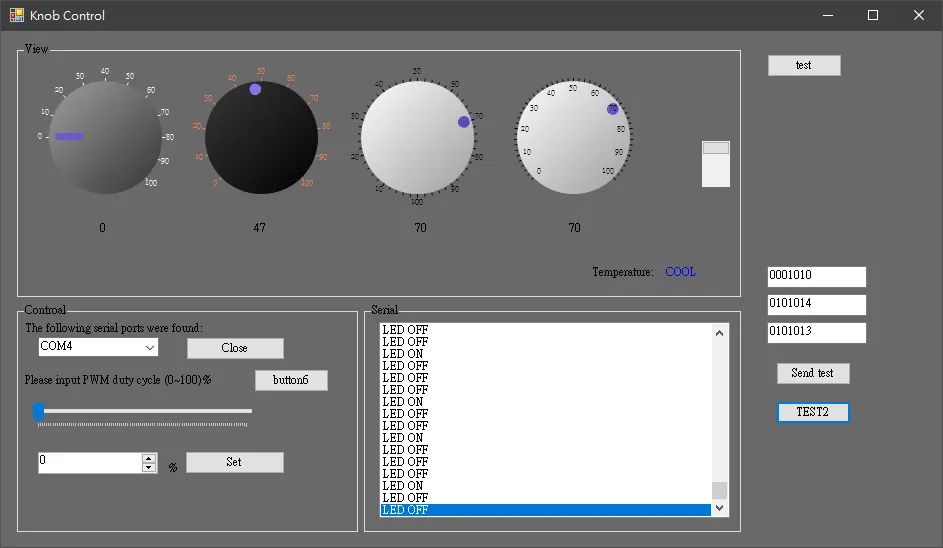
       Serial.println("LED OFF");
       break;
     case '1':
       digitalWrite(13, HIGH);
       Serial.println("LED ON");
       break;
      case '2':
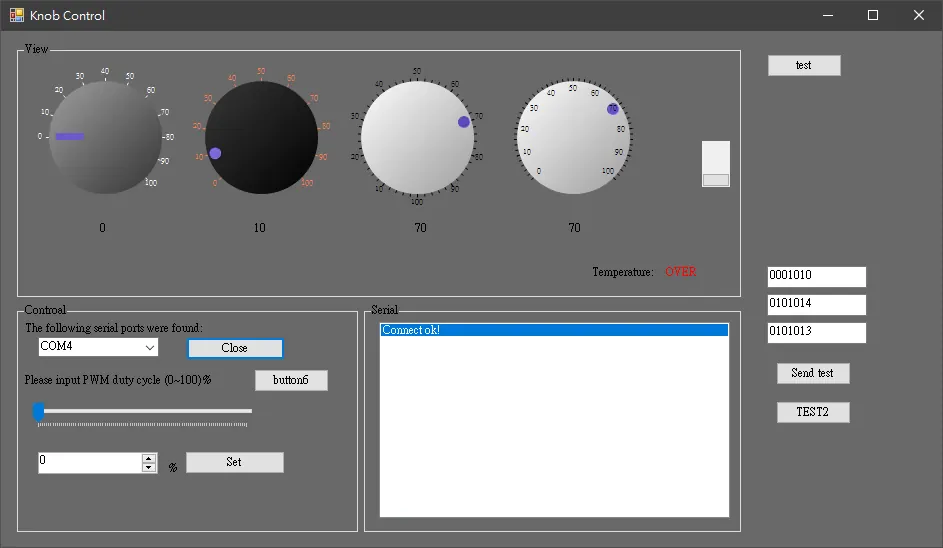
       Serial.println("Connect ok!");
       break;
      case '3':
       i = random(100);
       Serial.println("test"+String(i));
       break;
      case '4':
       i = random(2);
       Serial.println("warring"+String(i));
       break;
      case '5':
        Serial.println("Connect off!");
       return ;
       break;
     default:
       // 關掉所有的 LED
       digitalWrite(13, LOW);
     }
   }
}
Serial Port find.cs
當傳輸資料突然發生中斷時可能會導致 SerialPort 發生異常所以呢 我們必須要把重複的值弄掉

 void find_port()
        {
            string[] ports = SerialPort.GetPortNames();


            // Display each port name to the console.
            int count = 0;
            foreach (string port in ports)
            {
                count += 1;

            }

            if (count <= 0)
            {

                comboBox1.Items.Clear();
                comboBox1.Text = "";

                this.button2.Text = "Connect";
            }
            if (count > 0)
            {

                comboBox1.Text = "";

                comboBox1.Items.Clear();
                string[] result = ports.Distinct().ToArray();
                foreach (string port in result)
                {
                    comboBox1.Items.Add(port);

                }


            }
        }
Serial Receive Data.cs
   void SerialPort_DataReceived(object sender, SerialDataReceivedEventArgs e)
        {
            try
            {
                if (Connection == true)
                {
                    // byte RB = Byte.Parse(serialPort.ReadByte().ToString());
                    String back = serialPort1.ReadLine();


                    if (back.IndexOf("test") >= 0)
                    {
                        string back2 = back.Replace("test", "");
                        knobControl2.Value = Convert.ToInt32(back2);
                        // MessageBox.Show(back2);
                    }
                    else if (back.IndexOf("warring") >= 0)
                    {
                        string back2 = back.Replace("warring", "");
                        if (Convert.ToInt32(back2) == 0)
                            SetText2("0");

                        else
                            SetText2("1");
                        // MessageBox.Show(back2);
                    }
                    else
                        SetText(back);

                }
            }
            catch
            { serialPort1.Close(); }
            //byte RB = Byte.Parse(serialPort1.ReadByte().ToString());

            //SetText(  RB.ToString() + " ");

            //  listBox1.Items.Add(RB.ToString());
        }


Serial 跨執行續更新UI

        delegate void SetTextCallback(string text);
        private void SetText(string text)
        {
            if (Connection == true)
                if (this.listBox1.InvokeRequired)
                {
                    SetTextCallback d = new SetTextCallback(SetText);

                    this.Invoke(d, new object[] { text });

                }
                else
                {

                    this.listBox1.Items.Add(text);
                    this.listBox1.SelectedIndex = this.listBox1.Items.Count - 1;
                }

        }
Serial Send Data.cs
      private void SendPhone()
        {
            char[] textBuf;

            textBuf = this.textBox1.Text.ToCharArray();
            rs232Output(textBuf);
            //轉換成字串
            textBuf = "01001043".ToCharArray();
            rs232Output(textBuf);
           //直接寫入字串
            serialPort1.Write("0");
           //寫入Byte
            /*
                byte[] bytestosend = { 0x14, 0x0E };

            serialPort1.Write(bytestosend, 0, bytestosend.Length);
            /*
        }


   // 經由RS232 字串傳送
        private void rs232Output(char[] phoneNum)
        {
            try
            {
                for (int i = 0; i < phoneNum.Length; i++)
                {
                    serialPort1.Write(phoneNum, i, 1);
                    //serialPort.Write("A");
                }
                /*
                // 傳送 Enter 的 ascii code
                byte[] commEnter = new byte[] { 0x0D, 0x0A };
                for (int i = 0; i < 2; i++)
                {
                    serialPort1.Write(commEnter, i, 1);
                }*/
            }
            catch
            {
                this.button2.Text = "Connect";
                comboBox1.Text = "";

                comboBox1.Items.Clear();
                try
                {
                    serialPort1.DiscardInBuffer();       // RX
                    serialPort1.DiscardOutBuffer();      // TX
                                                         // 關閉 PORT
                    this.serialPort1.Close();
                }
                catch { }


            }
            Console.WriteLine("output Phone Number" + phoneNum.ToString());
        }
USB 傳輸中斷與解決方案.cs
 protected override void WndProc(ref Message m)

        {

            switch (m.Msg)

            {

                case Win32.WM_DEVICECHANGE: OnDeviceChange(ref m); break;

            }

            base.WndProc(ref m);

        }


        void OnDeviceChange(ref Message msg)

        {

            int wParam = (int)msg.WParam;

            if (wParam == Win32.DBT_DEVICEARRIVAL)USB有裝置插入
            {
                find_port();
                label1.Text = "Arrival";
            }
            else if (wParam == Win32.DBT_DEVICEREMOVECOMPLETE)USB有裝置拔除
            {

                label1.Text = "Remove";
                comboBox1.Items.Clear();
                comboBox1.Text = "";
                this.button2.Text = "Connect";
                try
                {
                    serialPort1.DiscardInBuffer();       // RX
                    serialPort1.DiscardOutBuffer();      // TX}
                }
                catch
                { }
                serialPort1.Close();
                rs232key = true;

            }

        }


        void RegisterHidNotification()

        {

            Win32.DEV_BROADCAST_DEVICEINTERFACE dbi = new

            Win32.DEV_BROADCAST_DEVICEINTERFACE();

            int size = Marshal.SizeOf(dbi);

            dbi.dbcc_size = size;

            dbi.dbcc_devicetype = Win32.DBT_DEVTYP_DEVICEINTERFACE;

            dbi.dbcc_reserved = 0;

            dbi.dbcc_classguid = Win32.GUID_DEVINTERFACE_HID;

            dbi.dbcc_name = 0;

            IntPtr buffer = Marshal.AllocHGlobal(size);

            Marshal.StructureToPtr(dbi, buffer, true);

            IntPtr r = Win32.RegisterDeviceNotification(Handle, buffer,

            Win32.DEVICE_NOTIFY_WINDOW_HANDLE);

            if (r == IntPtr.Zero)

                label1.Text = Win32.GetLastError().ToString();

        }

    }


    class Win32

    {

        public const int

        WM_DEVICECHANGE = 0x0219;

        public const int

        DBT_DEVICEARRIVAL = 0x8000,

        DBT_DEVICEREMOVECOMPLETE = 0x8004;

        public const int

        DEVICE_NOTIFY_WINDOW_HANDLE = 0,

        DEVICE_NOTIFY_SERVICE_HANDLE = 1;

        public const int

        DBT_DEVTYP_DEVICEINTERFACE = 5;

        public static Guid

        GUID_DEVINTERFACE_HID = new

        Guid("4D1E55B2-F16F-11CF-88CB-001111000030");

        public static Guid

        GUID_DEVINTERFACE_USB_DEVICE = new

        Guid("A5DCBF10-6530-11D2-901F-00C04FB951ED");


        [StructLayout(LayoutKind.Sequential)]

        public class DEV_BROADCAST_DEVICEINTERFACE

        {

            public int dbcc_size;

            public int dbcc_devicetype;

            public int dbcc_reserved;

            public Guid dbcc_classguid;

            public short dbcc_name;

        }


        [DllImport("user32.dll", SetLastError = true)]

        public static extern IntPtr RegisterDeviceNotification(

        IntPtr hRecipient,

        IntPtr NotificationFilter,

        Int32 Flags);


        [DllImport("kernel32.dll")]

        public static extern int GetLastError();


    }
serial_port_setting.cs
 if (rs232key)
                {
                    // 打開 PORT
                    this.button2.Text = "Close";
                    // 檢查 PORT 是否關閉
                    // 設定使用的 PORT
                    serialPort1.PortName = (string)comboBox1.SelectedItem;
                    // 初始化 PORT
                    this.serialPort1.BaudRate = 115200;            // baud rate = 9600
                    this.serialPort1.Parity = Parity.None;       // Parity = none
                    this.serialPort1.StopBits = StopBits.One;    // stop bits = one
                    this.serialPort1.DataBits = 8;               // data bits = 8
                    // 設定 PORT 接收事件
                    serialPort1.DataReceived += new SerialDataReceivedEventHandler(SerialPort_DataReceived);
                    // 檢查 PORT 是否關閉
                    if (!serialPort1.IsOpen)
                        this.serialPort1.Close();
                    serialPort1.Open();
                    // 清空 serial port 的緩存
                    serialPort1.DiscardInBuffer();       // RX
                    serialPort1.DiscardOutBuffer();      // TX
                    serialPort1.Write("2");
                    rs232key = false;
                    // comboBox1.Text = "";
                    // this.button2.Text = "Connect";
                    // rs232key = true;
                    // timer2.Enabled = false;
                    //serialPort1.Close();
                    Connection = true;

                }
                else
                {

                    Connection = false;
                    this.button2.Text = "Connect";
                    timer2.Stop();
                    timer2.Enabled = false;
                    // 清空 serial port 的緩存
                    //serialPort1.DiscardInBuffer();       // RX
                    // serialPort1.DiscardOutBuffer();      // TX

                    // 關閉 PORT
                    Application.DoEvents();
                    this.serialPort1.Close();

                    rs232key = true;
                    comboBox1.Text = "";
                }
serial
Comments