

RTMFP VS RTMP
---
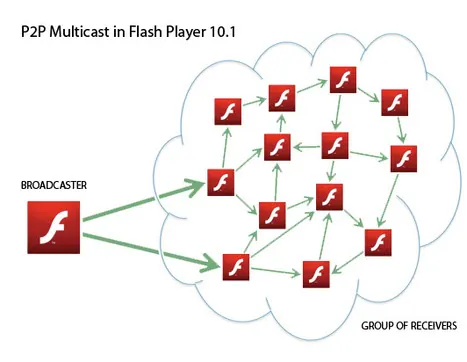
什么是RTMFP? RTMFP 是 Real‐Time Media Flow Protocol的缩写,是Adobe准备推出的一种新的通信协议,这种通信协议可以让 Flash 客户端直接和另外一个Flash 客户端之间进行数据通信,也就是常说的p2p的方式进行通信。 什么时候能用上RTMFP?需要什么技术支持? 只有下一个版本的播放器:Flash Player10 才支持RTMFP 协议,同时服务器端还需要下一个版本的 Flash Media Server,估计就是FMS4了,(我博客之前的一篇文章:http://www.cuplayer.com/index.php?play=reply&id=115没猜错)。 目前虽然Flash Player10的预览版本已经出来了,但是FMS4发布日期还没有定下来。所以目前RTMFP还体验不了。 RTMFP有哪些新的功能? 使用RTMFP,一些使用即时通讯技术的Flash应用,例如在线聊天,在线多人游戏等应用的通信效率将会大大提高,因为RTMFP支持客户端之间直接通信,包括麦克风、摄像头的共享等。(目前Flash客户端之间的通信都是要先经过服务器中转的,所以效率不高,服务器压力比较大,RTMFP技术出现后这些问题将会迎刃而解)。 不过RTMFP不支持文件的传输和共享。 RTMFP给我们带来什么好处? RTMFP将会大大地减少音视频直播、点播、多人在线游戏等应用的网络带宽的消耗,减轻服务器的负担。因为很多数据都是客户端之间直接传输了,无须再经过服务器中转了。 RTMFP由于使用了UDP网络协议,所以相对之前的TCP协议在数据传输效率上也会大大提高,这种优势在音视频数据传输方面是非常明显的。 关于TCP和UDP网络通信协议之间的区别以及各自的优缺点大家可以去网上搜索相关的介绍,这里就不再做过多的介绍了。 RTMFP和RTMP有哪些区别? 从本质上的区别就是网络通信的协议不一样,RTMFP是使用User Datagram Protocol (UDP)协议,而RTMP是使用Transmission Control Protocol (TCP)协议。 UDP协议对比TCP协议最大的优点就是传输流媒体数据的时候效率非常高,网络延迟少,增强音视频的传输质量,以及网络连接的可靠性增强。 RTMP的客户端之间要进行数据通信,必须先将数据发送到FMS等服务器端,然后服务器端再转发到另外一个用户,而RTMFP则支持客户端直接发送数据到另外一个客户端,无需经过服务器的中转。此时你也许会问,居然客户端之间的数据可以之间通信,还要FMS服务器做什么?其实此时的FMS服务器只起到桥梁作用,因为客户端之间要创建通信会话就必须要知道对方客户端的相关信息,就相当于你找对象要先经过媒婆介绍一样的道理,哈哈。 下面的示意图表现了RTMFP和RTMP的不同之处: RTMFP适合用于哪些类型的应用? RTMFP比较适合用于网络通信数据量比较大,通信即时性要求比较强的应用,例如VoIP,音视频即时沟通工具(IM),多人网络游戏等等。 Adobe以后还会丰富RTMFP相关技术吗? 会的,Adobe以后还会一如既往地对RTMFP进行进一步增强、优化以适合市场发展的需求,不过目前还没有进一步的相关声明。
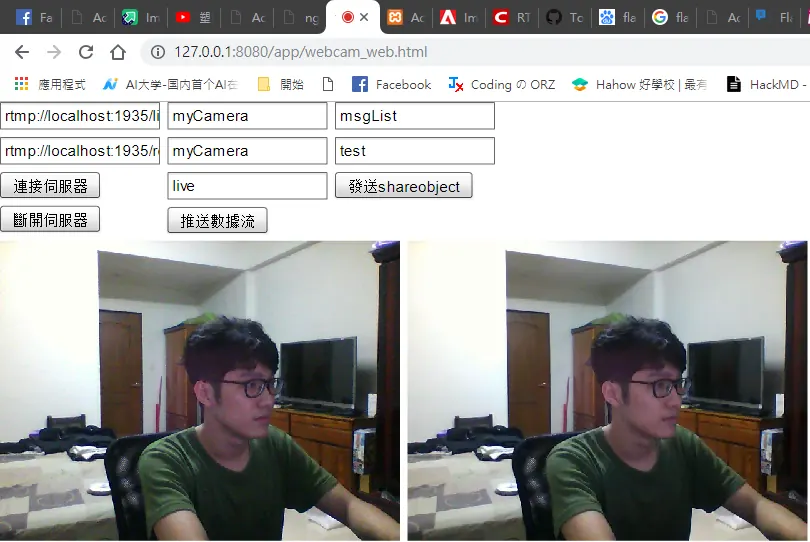
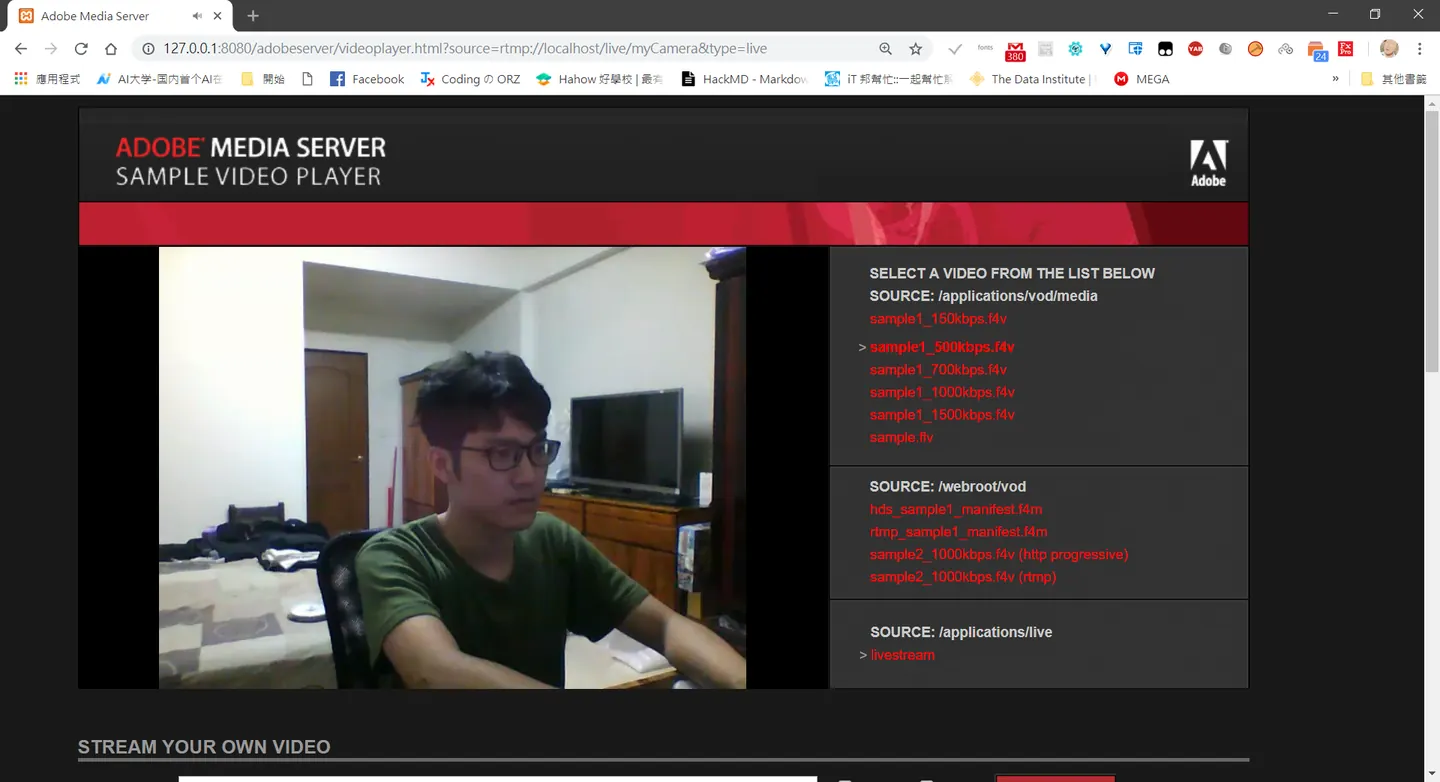
推送去有支援rtmp的mediaserver,不過延遲的問題可能要考慮到buffertime
打造一個多人視訊系統
---
請注意參數設定的 ams.ini Application.xml terminal 這關係到應用程式是否能正常運行,上述檔案有關檔案是否有權限。
Application.xml
<Application>
<StreamManager>
        <VirtualDirectory>
              <!-- Specifies application specific virtual directory mapping for streams.   -->
            <Streams>/;${ROOM_DIR}</Streams>
        </VirtualDirectory>
         <StreamRecord override="yes">true</StreamRecord>
    </StreamManager>


    <SharedObjManager>
            <ClientAccess override="yes">true</ClientAccess>
    </SharedObjManager>

</Application>
ams.ini
###########################################################################
# ams.ini contains substitution variables for Adobe Media Server          #
# configuration files. Lines beginning with '#' are considered comments.  #
# A substitution variable is in the form <name>=<value>. Everything up to #
# the first '=' is considered the name of the substitution variable, and  #
# everything after the first '=' is considered the substitution value. If #
# you want a substitution variable to have leading or trailing spaces,    #
# enclose the value around double quotes. For example, foo=" bar "        #
###########################################################################

###############################################################
# This section contains configurable parameters in Server.xml #
###############################################################

# Username for server admin
# For example:
#    SERVER.ADMIN_USERNAME = foo
#
SERVER.ADMIN_USERNAME = x213212

# IP address and port Adobe Media Admin Server should listen on
# For example:
#    SERVER.ADMINSERVER_HOSTPORT = :1111
#
SERVER.ADMINSERVER_HOSTPORT = :1111

# User id in which to run the process (Linux Only)
# For example:
#    SERVER.PROCESS_UID = 500
#
SERVER.PROCESS_UID =

# Group id in which to run the process (Linux Only)
# For example:
#    SERVER.PROCESS_GID = 500
#
SERVER.PROCESS_GID =

# License key for Adobe Media Server
# For example:
#    SERVER.LICENSEINFO = XXXX-XXXX-XXXX-XXXX-XXXX-XXXX
#
SERVER.LICENSEINFO = 1652-5580-8001-8333-2201-1631

# LIVE_DIR denotes the full path of sample "Live" application's
# folder for storing any live stream recorded by server.
# For example:
#    LIVE_DIR = <AMS_Installation_Dir>\applications\live
#
LIVE_DIR = C:\Program Files\Adobe\Adobe Media Server 5\applications\live
ROOM_DIR = C:\Program Files\Adobe\Adobe Media Server 5\applications\room <----------------------------------------------------------
# VOD_COMMON_DIR denotes the full path of sample "VOD" application's
# folder for storing onDemand and Progressive Download .flv/.mp3 files.
# File stored in this folder can be streamed and are also PD-able.
# Note : If you are using the default installation of Apache as a webserver,
# and if you modify VOD_COMMON_DIR, please change the document root
# accordingly in httpd.conf.
# For example:
#    VOD_COMMON_DIR = <AMS_Installation_Dir>\webroot\vod
#
VOD_COMMON_DIR = C:\Program Files\Adobe\Adobe Media Server 5\webroot\vod

# VOD_DIR denotes the full path of sample "VOD" application's
# folder for storing onDemand only .flv/.mp3 files. Files stored in
# this folder are not PD-able
# For example:
#    VOD_DIR = <AMS_Installation_Dir>\applications\vod\media
#
VOD_DIR = C:\Program Files\Adobe\Adobe Media Server 5\applications\vod\media

# The maximum size of the FLV cache, in megabytes.
# The default is 500MB.
#
SERVER.FLVCACHE_MAXSIZE=500

# Whether to start and stop the included HTTP server along
# with AMS.
#
SERVER.HTTPD_ENABLED = true

# Whether to start and stop the cache cleaning tool along
# with HTTP server.
#
SERVER.HTCACHECLEAN_ENABLED = true

# The path specifying the cache root for webserver caching - this path is passed on to htcacheclean which periodically cleans cache files stored in this location.
# Note: Make sure that the same cache root path is also specified for Apache httpd using the CacheRoot directive in httpd.conf
SERVER.HTCACHEROOT = C:\Program Files\Adobe\Adobe Media Server 5\Apache2.4\cacheroot

################################################################
# This section contains configurable parameters in Adaptor.xml #
################################################################

# IP address and port(s) Adobe Media Server should listen on
# For example:
#    ADAPTOR.HOSTPORT = :1935,80
#
ADAPTOR.HOSTPORT = :1935

# IP (address and) port that Adobe Media Server should proxy
# unknown HTTP requests to. Leave empty to disable proxying.
# With no address, specifies a localhost port.
# For example:
#    HTTPPROXY.HOST = webfarm.example.com:80
#
HTTPPROXY.HOST = :8134

#This tag specifies an IP address for the player to use instead of a hostname when
#making the RTMPT connection to AMS. If nothing is specified, AMS will automatically
#determine the IP to use.
#
ADAPTOR.HTTPIDENT2 =


##############################################################
# This section contains configurable parameters in Vhost.xml #
##############################################################

# Application directory for the virtual host
# For example:
#    VHOST.APPSDIR = C:\myapps
#
VHOST.APPSDIR = C:\Program Files\Adobe\Adobe Media Server 5\applications

####################################################################
# This section contains configurable parameters in Application.xml #
####################################################################

# List of semi-colon delimited paths in which to search for script to load
# For example:
#    APP.JS_SCRIPTLIBPATH = C:\scripts;C:\Program Files\Foo\scripts
#
APP.JS_SCRIPTLIBPATH = C:\Program Files\Adobe\Adobe Media Server 5\scriptlib

###############################################################
# This section contains configurable parameters in Logger.xml #
###############################################################

LOGGER.LOGDIR =

####################################################################
# This section contains configurable parameters in Users.xml #
####################################################################

# Enable or disable using HTTP requests to execute admin commands.
# Set to "true" to enable, otherwise it will be disabled.  The
# actual commands permitted for server admin and virtual host admin
# users can be set in Users.xml.

USERS.HTTPCOMMAND_ALLOW = true
main.asc
application.onAppStart = function() {
    trace("onAppStart");
};

//新客户端连接时触发
application.onConnect = function(client, uName) {
    trace("onConnect = "+uName);
    client.UserName = uName;
    application.acceptConnection(client);//允许客户登录,如果要对客户身份做验证,在此扩展即可
    hellomsg="system message"+client.UserName+" 進入房間";
    application.broadcastMsg("showmsg",hellomsg);//调用所有client的showmsg方法,并传递参数hellomsg(客户端的代码中,必须有对应的showmsg函数)

    //定义服务端的sendmsg方法,以便客户端能调用
    client.sendmsg = function(msg) {
        mesg = client.UserName+": "+msg;
        //每次client调用本方法后,服务器同步广播到所有client
        application.broadcastMsg("showmsg",mesg)
    };

};

//有客户端断开连接时触发
application.onDisconnect = function(client) {
    trace("onDisconnect ="+client.UserName);
    hellomsg="system message"+client.UserName+" 離開房間";
    application.broadcastMsg("showmsg",hellomsg)
};
application.onAppStop = function() {
    trace("onAppStop");
};
terminal
"C:\Program Files\Adobe\Adobe Media Server 5\tools\far.exe" -package -archive main -files Application.xml main.asc
編譯 far檔案

需要再hosts檔案最下面插入127.0.0.1 activate.adobe.com 這樣伺服器才抓的到 asc檔案
C:\Windows\System32\drivers\etc\hosts

# Copyright (c) 1993-2009 Microsoft Corp.
#
# This is a sample HOSTS file used by Microsoft TCP/IP for Windows.
#
# This file contains the mappings of IP addresses to host names. Each
# entry should be kept on an individual line. The IP address should
# be placed in the first column followed by the corresponding host name.
# The IP address and the host name should be separated by at least one
# space.
#
# Additionally, comments (such as these) may be inserted on individual
# lines or following the machine name denoted by a '#' symbol.
#
# For example:
#
#      102.54.94.97     rhino.acme.com          # source server
#       38.25.63.10     x.acme.com              # x client host

# localhost name resolution is handled within DNS itself.
#   127.0.0.1       localhost
#   ::1             localhost
127.0.0.1 activate.adobe.com
video.as
<?xml version="1.0" encoding="utf-8"?>
<s:Application xmlns:fx="http://ns.adobe.com/mxml/2009"
xmlns:s="library://ns.adobe.com/flex/spark"
xmlns:mx="library://ns.adobe.com/flex/mx"
creationComplete="windowedapplication1_creationCompleteHandler(event)">
<fx:Declarations>
<!-- Place non-visual elements (e.g., services, value objects) here -->
</fx:Declarations>
<fx:Script>
<![CDATA[
import flash.display.MovieClip;
import flash.events.NetStatusEvent;
import flash.media.Camera;
import flash.media.Microphone;
import flash.media.Video;
import flash.net.NetConnection;
import flash.net.NetStream;
import mx.charts.CategoryAxis;
import mx.collections.ArrayCollection;
import mx.controls.Alert;
import mx.core.UIComponent;
import mx.events.FlexEvent;
var nc:NetConnection;
var nc2:NetConnection;
var ns:NetStream;
var nsPlayer:NetStream;
var vid:Video;
var vidPlayer:Video;
var cam:Camera;
var mic:Microphone;
var talk_so:SharedObject;
var screen_w:int=320;
var screen_h:int=240;
var now_people:Number;
[Bindable]
var ready:Boolean;
var media_server:Boolean;
var shareObject_server:Boolean;
protected function windowedapplication1_creationCompleteHandler(event:FlexEvent):void
{
publish.enabled=false;
send_shareobject.enabled=false;
}
public function onBWDone():void {
trace("11");
}
public function onBWDone2():void {
trace("11");
}
private function onNetStatus(event:NetStatusEvent):void{
trace(event.info.code);
if(event.info.code == "NetConnection.Connect.Success"){
//
publish.enabled=true;
}
else
{
trace ("連接失敗"+event.info.code);
}
}
private function netStatusHandler(evt:NetStatusEvent):void
{
trace(evt.info.code); //调试代码用
if ( evt.info.code =="NetConnection.Connect.Success" )
{
// nc2.client ={ onBWDone: function():void{} };
// talk_so = SharedObject.getRemote("talk",nc2.uri,true);
//
// trace(nc2.uri)
// talk_so.addEventListener(SyncEvent.SYNC,talkSoSyncHandler);
// talk_so.connect(nc2);
//talk_so.fps=0.1;
talk_so = SharedObject.getRemote("userList",nc2.uri,false);
talk_so.connect(nc2);
talk_so.addEventListener(SyncEvent.SYNC,talkSoSyncHandler);
send_shareobject.enabled=true;
trace ("連接房間成功!");
}
else
{
trace ("連接不到房間!");
}
}
private function publishCamera( publish_name:String,play_type:String)
{
//Cam
try{
cam = Camera.getCamera();
cam.setMode(640, 480,60);
/**
* public function setKeyFrameInterval(keyFrameInterval:int):void
* The number of video frames transmitted in full (called keyframes) instead of being interpolated by the video compression algorithm.
* The default value is 15, which means that every 15th frame is a keyframe. A value of 1 means that every frame is a keyframe.
* The allowed values are 1 through 300.
*/
cam.setKeyFrameInterval(1);
/**
* public function setQuality(bandwidth:int, quality:int):void
* bandwidth:int — Specifies the maximum amount of bandwidth that the current outgoing video feed can use, in bytes per second (bps).
* To specify that the video can use as much bandwidth as needed to maintain the value of quality, pass 0 for bandwidth.
* The default value is 16384.
* quality:int — An integer that specifies the required level of picture quality, as determined by the amount of compression
* being applied to each video frame. Acceptable values range from 1 (lowest quality, maximum compression) to 100
* (highest quality, no compression). To specify that picture quality can vary as needed to avoid exceeding bandwidth,
* pass 0 for quality.
*/
cam.setQuality(0,100);
/**
* public function setProfileLevel(profile:String, level:String):void
* Set profile and level for video encoding.
* Possible values for profile are H264Profile.BASELINE and H264Profile.MAIN. Default value is H264Profile.BASELINE.
* Other values are ignored and results in an error.
* Supported levels are 1, 1b, 1.1, 1.2, 1.3, 2, 2.1, 2.2, 3, 3.1, 3.2, 4, 4.1, 4.2, 5, and 5.1.
* Level may be increased if required by resolution and frame rate.
*/
//var h264setting:H264VideoStreamSettings = new H264VideoStreamSettings();
// h264setting.setProfileLevel(H264Profile.MAIN, 4);
//Mic
mic = Microphone.getMicrophone();
/*
* The encoded speech quality when using the Speex codec. Possible values are from 0 to 10. The default value is 6.
* Higher numbers represent higher quality but require more bandwidth, as shown in the following table.
* The bit rate values that are listed represent net bit rates and do not include packetization overhead.
* ------------------------------------------
* Quality value | Required bit rate (kbps)
*-------------------------------------------
* 0 | 3.95
* 1 | 5.75
* 2 | 7.75
* 3 | 9.80
* 4 | 12.8
* 5 | 16.8
* 6 | 20.6
* 7 | 23.8
* 8 | 27.8
* 9 | 34.2
* 10 | 42.2
*-------------------------------------------
*/
mic.encodeQuality = 9;
/* The rate at which the microphone is capturing sound, in kHz. Acceptable values are 5, 8, 11, 22, and 44. The default value is 8 kHz
* if your sound capture device supports this value. Otherwise, the default value is the next available capture level above 8 kHz that
* your sound capture device supports, usually 11 kHz.
*
*/
mic.rate = 44;
ns = new NetStream(nc);
//H.264 Setting
//ns.videoStreamSettings = h264setting;
ns.attachCamera(cam);
ns.attachAudio(mic);
ns.publish(publish_name, play_type);
}
catch(error:Error)
{
cam=null;
trace ("找不到視訊鏡頭");
return ;
}
/**
* public function setMode(width:int, height:int, fps:Number, favorArea:Boolean = true):void
* width:int — The requested capture width, in pixels. The default value is 160.
* height:int — The requested capture height, in pixels. The default value is 120.
* fps:Number — The requested capture frame rate, in frames per second. The default value is 15.
*/
}
private function displayPublishingVideo():void {
trace ("開始撥放當前視訊鏡頭");
if(cam != null){
vid = new Video(screen_w, screen_h);
// vid.x = 10;
// vid.y = 10;
vid.attachCamera(cam);
var tmp:UIComponent = new UIComponent();
tmp.addChild(vid);
canvas.addElement(tmp);
}
}
private function displayPlaybackVideo(publish_name:String):void{
trace ("開始撥放返回數據流");
nsPlayer = new NetStream(nc);
nsPlayer.bufferTime = 0.1;
nsPlayer.play(publish_name);
vidPlayer = new Video(screen_w, screen_h);
// vidPlayer.x = screen_w + 20;
// vidPlayer.y = 10;
//
vidPlayer.attachNetStream(nsPlayer);
var tmp:UIComponent = new UIComponent();
tmp.addChild(vidPlayer);
canvas2.addElement(tmp);
}
protected function publish_clickHandler(event:MouseEvent):void
{
// TODO Auto-generated method stub
trace ("開始推送數據流");
publishCamera(publish_name.text,publish_type.text);
displayPlaybackVideo(getback_name.text);
displayPublishingVideo();
}
protected function connection_clickHandler(event:MouseEvent):void
{
// TODO Auto-generated method stub
// TODO Auto-generated method stub
try{
nc = new NetConnection();
nc.addEventListener(NetStatusEvent.NET_STATUS, onNetStatus);
nc.connect(publish_address.text);
nc.client ={ onBWDone: function():void{} };
// TODO Auto-generated method stub
nc2 = new NetConnection();
nc2.addEventListener(NetStatusEvent.NET_STATUS, netStatusHandler);
nc2.connect(shareObject_address.text,shareObject_name.text);
nc2.client ={ onBWDone: function():void{} };
nc2.client.showmsg = function (str:String):void
{
msg.text=msg.text+str+"\n";
};
}
catch(error:Error)
{
trace (error.message);
}
}
protected function disconnection(event:MouseEvent):void
{
// TODO Auto-generated method stub
nc.close();
nc2.close();
nc=null;
nc=null;
}
protected function send_shareobject_clickHandler(event:MouseEvent):void
{
// TODO Auto-generated method stub
nc2.call("sendmsg",null,shareObject_msg.text);
// var arr:ArrayCollection = new ArrayCollection();
//
//
//
// if ( talk_so.data.msgList==null )
// {
// arr = new ArrayCollection();
// }
// else
// {
// convertArrayCollection(arr,talk_so.data.msgList as ArrayCollection);
// }
//
// var obj:message = new message();
// obj.nickname="x213212";
// obj.msg=shareObject_msg.text;
// obj.time = new Date();
//
// arr.addItem(obj);
//
// talk_so.setProperty("msgList",arr);
//
}
private function convertArrayCollection(arrNew:ArrayCollection,arrOld:ArrayCollection):void
{
arrNew.removeAll();
for(var i:int=0;i<arrOld.length ;i++)
{
arrNew.addItemAt(arrOld.getItemAt(i),i);
}
}
private function talkSoSyncHandler(evt:SyncEvent):void
{
var tmp:ArrayCollection = new ArrayCollection();
msg.text="";
if ( talk_so.data.msgList!=null )
{
convertArrayCollection(tmp,talk_so.data.msgList as ArrayCollection);
for(var i:int=0;i<tmp.length ;i++)
{
var msg:Object = tmp.getItemAt(i);
var fullMsg:String=msg.nickname+"in"+msg.time.toTimeString()+"join:"+msg.msg;
msg.text=msg.text+fullMsg+"\n";
trace (fullMsg);
}
}
}
]]>
</fx:Script>
<s:VGroup>
<s:HGroup>
<s:VGroup width="33%">
<s:TextInput id="publish_address" text="rtmp://localhost/live">
</s:TextInput>
<s:TextInput id="shareObject_address" text="rtmp://localhost/room">
</s:TextInput>
<s:Button click="connection_clickHandler(event)" label="連接伺服器">
</s:Button >
<s:Button click="disconnection(event)" label="斷開伺服器">
</s:Button >
</s:VGroup>
<s:VGroup width="33%">
<s:TextInput id="publish_name" text="myCamera">
</s:TextInput>
<s:TextInput id="getback_name" text="myCamera2">
</s:TextInput>
<s:TextInput id="publish_type" text="live">
</s:TextInput>
<s:Button id="publish" click="publish_clickHandler(event)" label="推送數據流" >
</s:Button >
</s:VGroup>
<s:VGroup width="33%">
<s:TextInput id="shareObject_name" text="msgList">
</s:TextInput>
<s:TextInput id="shareObject_msg" text="test">
</s:TextInput>
<s:Button id="send_shareobject" click="send_shareobject_clickHandler(event)" label="發送訊息" >
</s:Button >
</s:VGroup>
</s:HGroup>
<s:HGroup>
<mx:Canvas id="canvas" height="{screen_h}" width="{screen_w}">
</mx:Canvas>
<mx:Canvas id="canvas2" height="{screen_h}" width="{screen_w}">
</mx:Canvas>
</s:HGroup>
<s:HGroup>
<s:TextInput id="msg" height="159" width="366">
</s:TextInput>
</s:HGroup>
</s:VGroup>
</s:Application>
防火牆設定
---
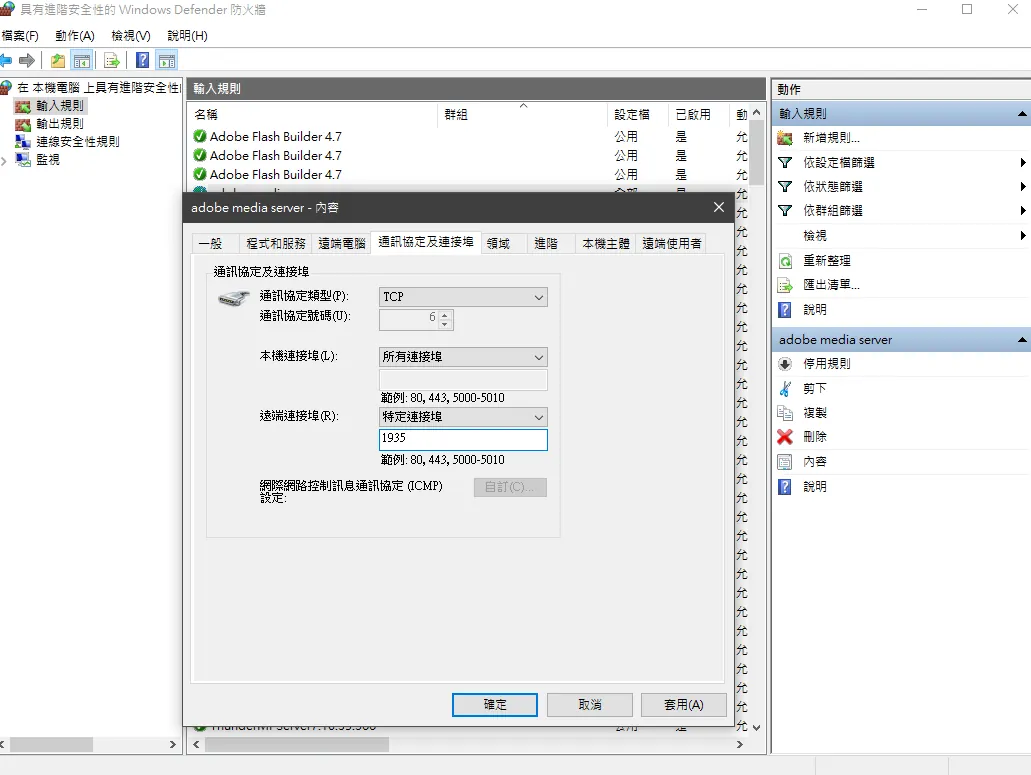
最重要!,連到伺服器外面連接埠,一定要把輸出輸入原則納編新增連接連接埠1935設為允許,
不同電腦之間連接,防火牆一定要設置,否則debug到爽。
shareObject
---
痾最後我不打算用shareObject,由於在性能上,適用共享去廣播參數,這會導致客戶端有無想接收訊息都會接受到廣播,第二個原因就是我弄到今天,在flash非同步的狀況下,fso檔案到底有沒有被寫入,原因可能就是上述,功力不夠?,綜合以上所已改用其他來開發
https://blog.csdn.net/wkyb608/article/details/5930823
結
---
上述算是未完成的程式碼懶得寫了,主要可以獲得該執行程式可以透過廣播的方式去傳遞,只要自行定義傳遞參數,把自己直播推流,和id傳遞過來基本再加一點邏輯判斷,一對多多對多,基本上都可以,視訊,監視器,直播阿應該都可以透過adobe media server實現,rtmp,至於詬病https://blog.csdn.net/haima1998/article/details/78007123,速度方面可能改天再做一個p2p之間的傳輸,目前adobe media server 會自動轉為 rtmfp所以之前的癥結點沒囉,目前等公司提案再來考慮要不要搭建其他平台囉。
Comments