
前置作業
我們近來到這裡我們找尋左邊的
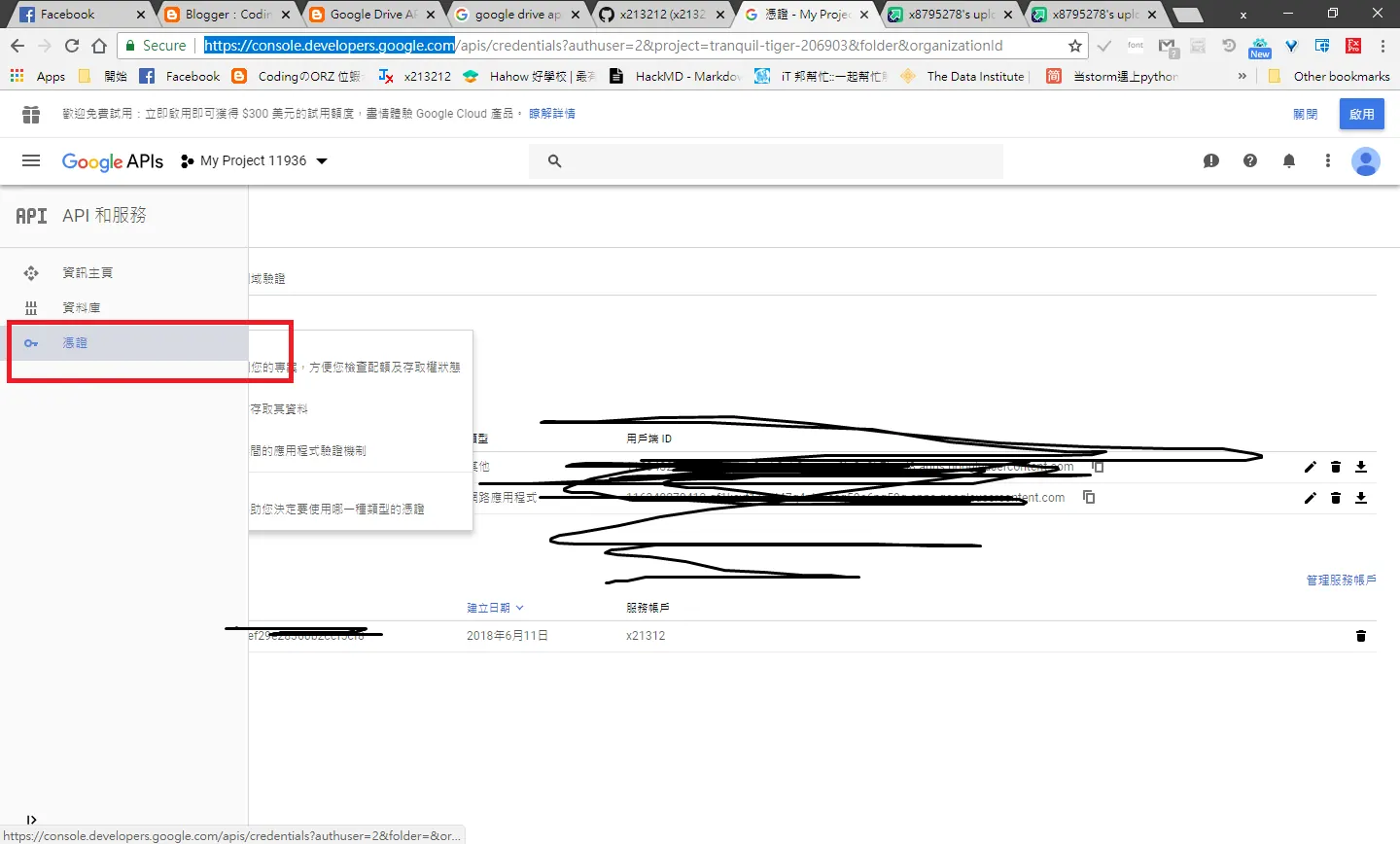 接下來呢
接下來呢
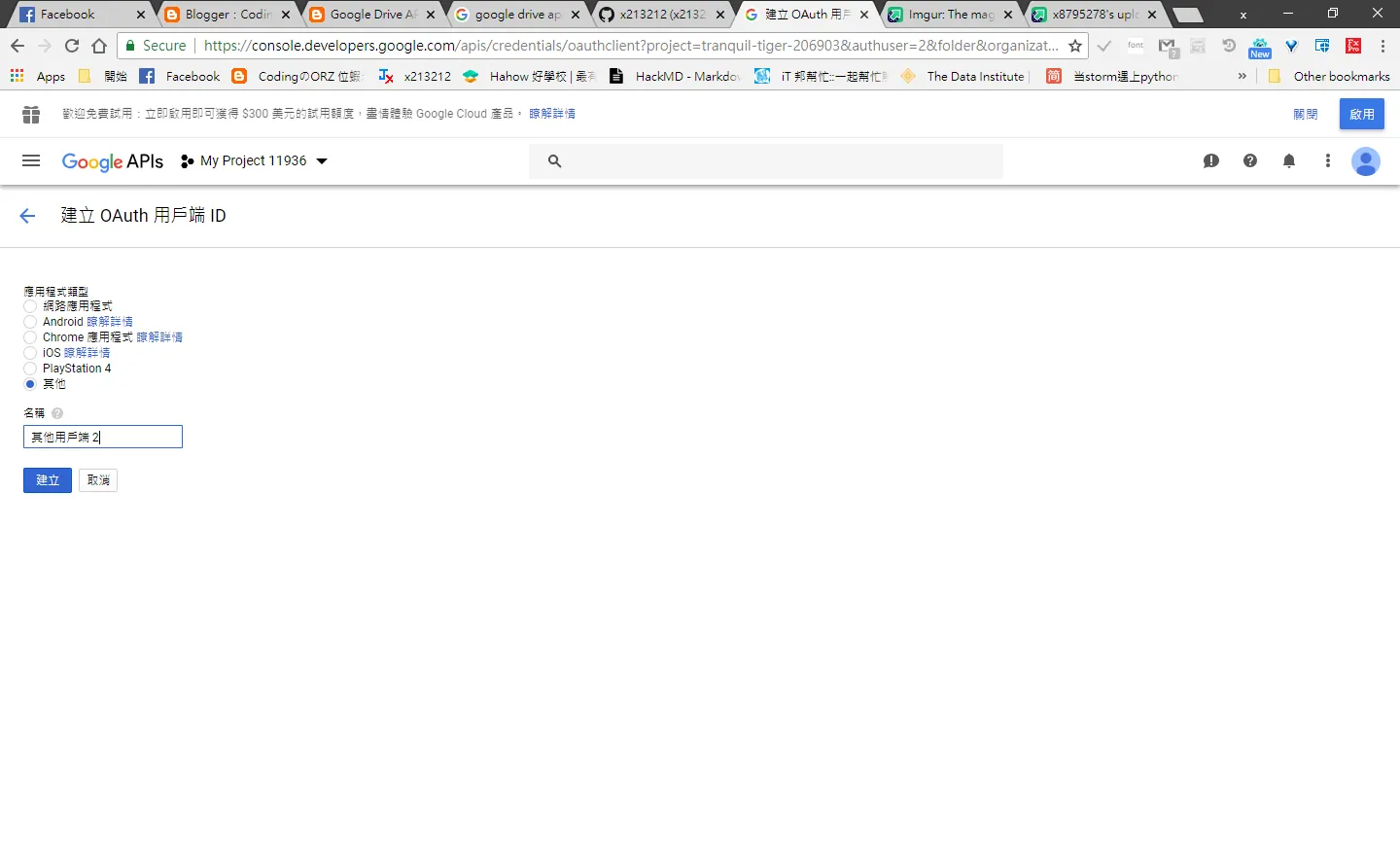 應用程式類型一定要選擇其他
然後呢
創建完後得到
應用程式類型一定要選擇其他
然後呢
創建完後得到
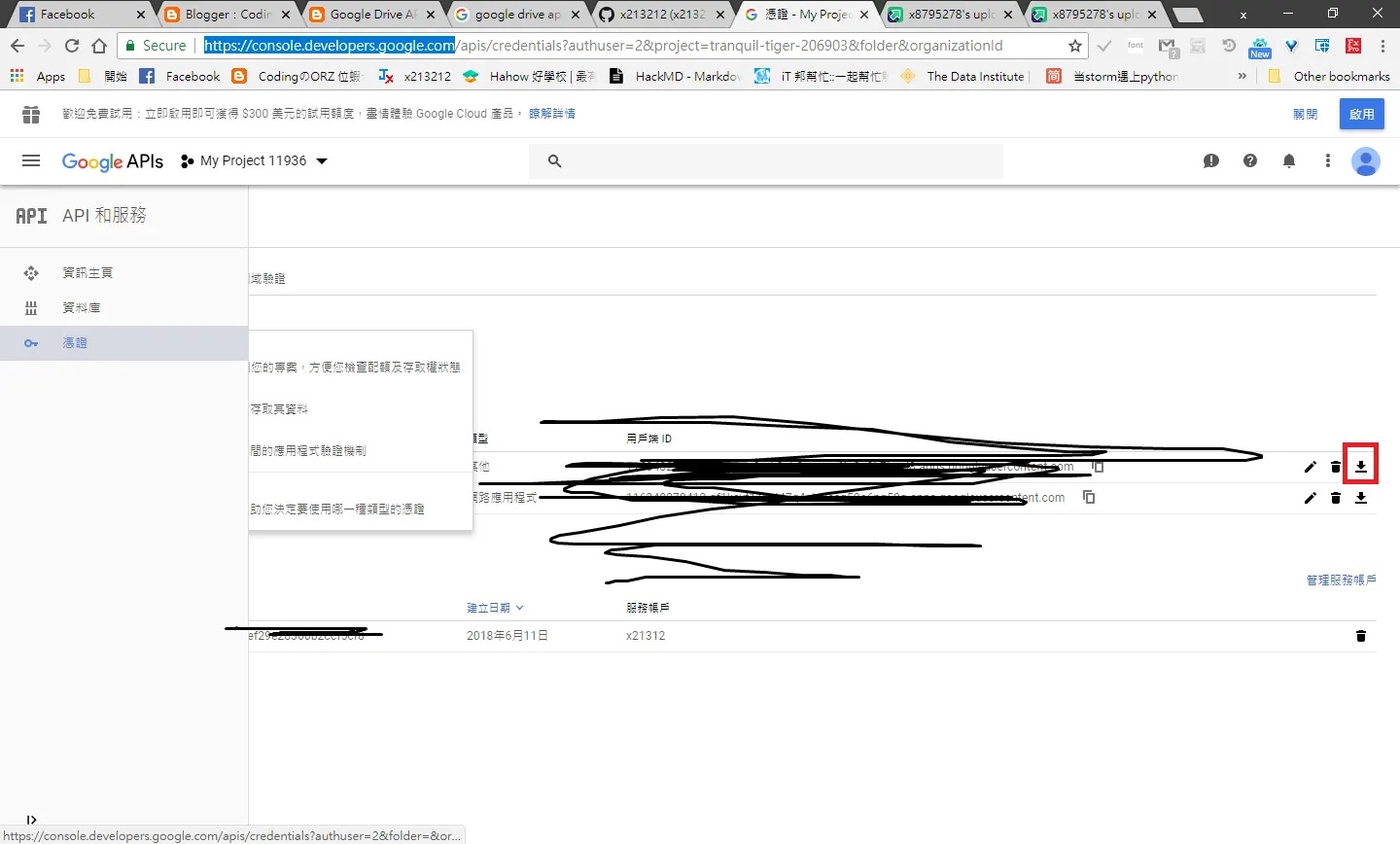 下載後得到一個json
Visual Studio
透過NUGET 搜尋並下載 Google APIs Client Library點選右方安裝!
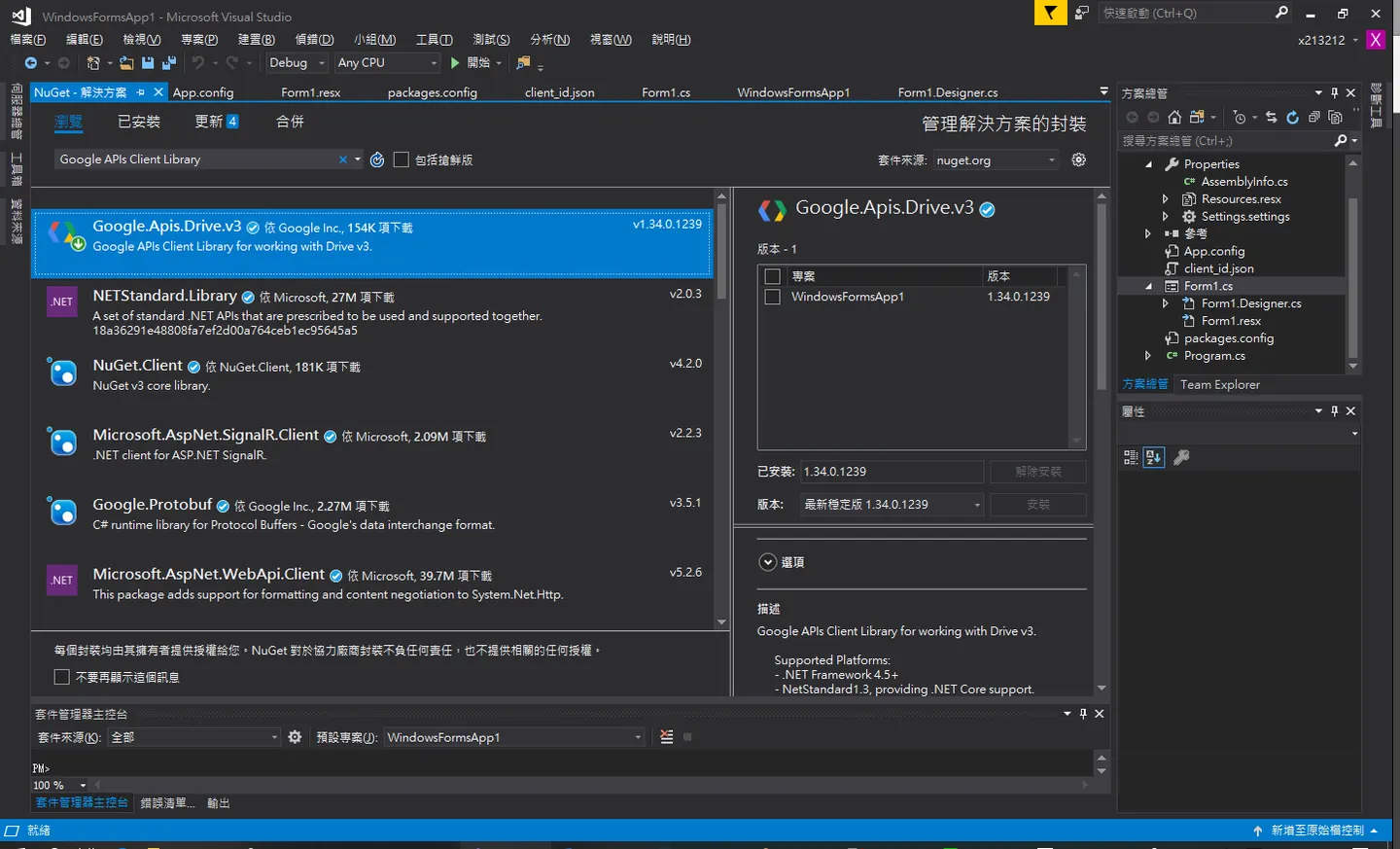
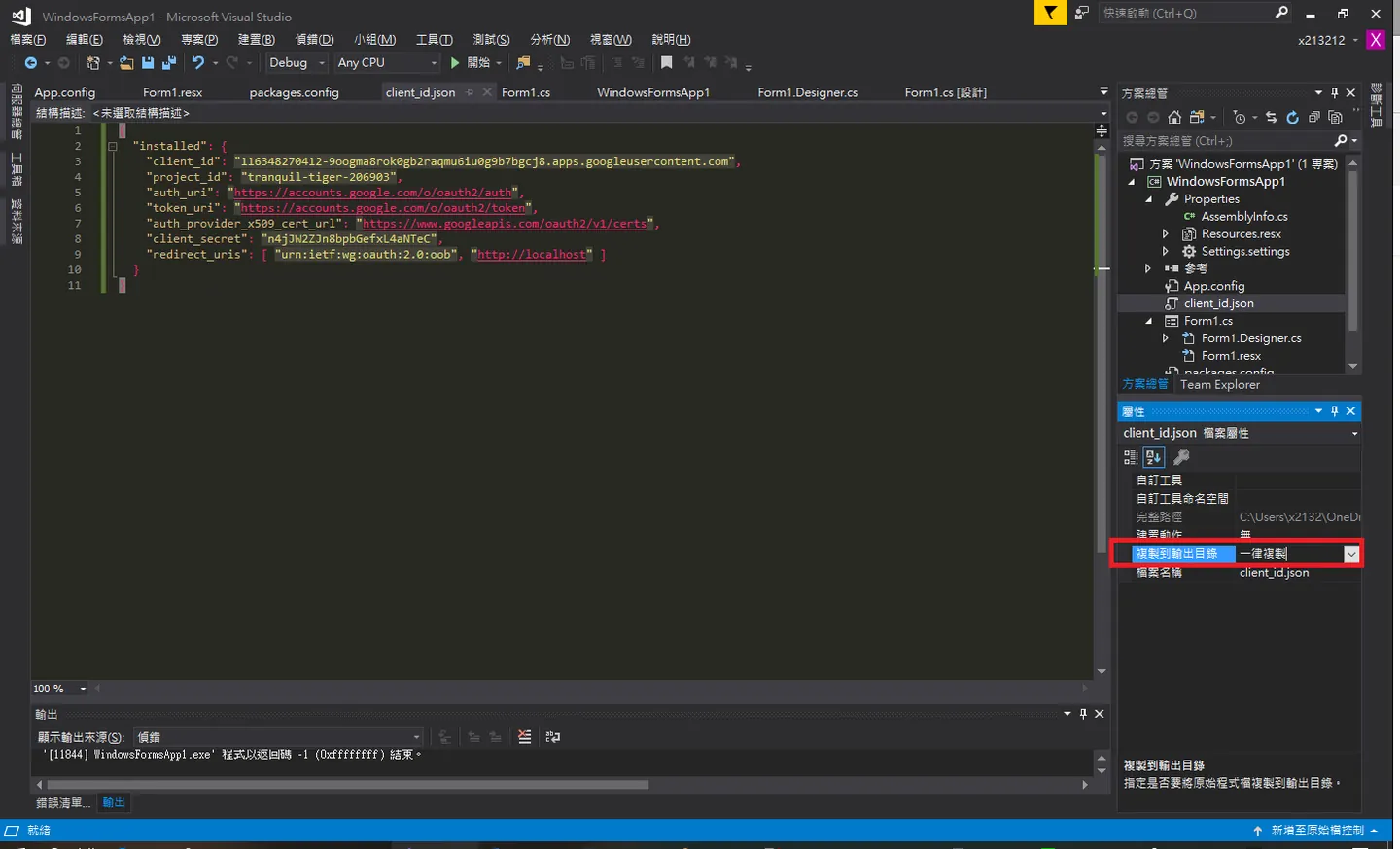
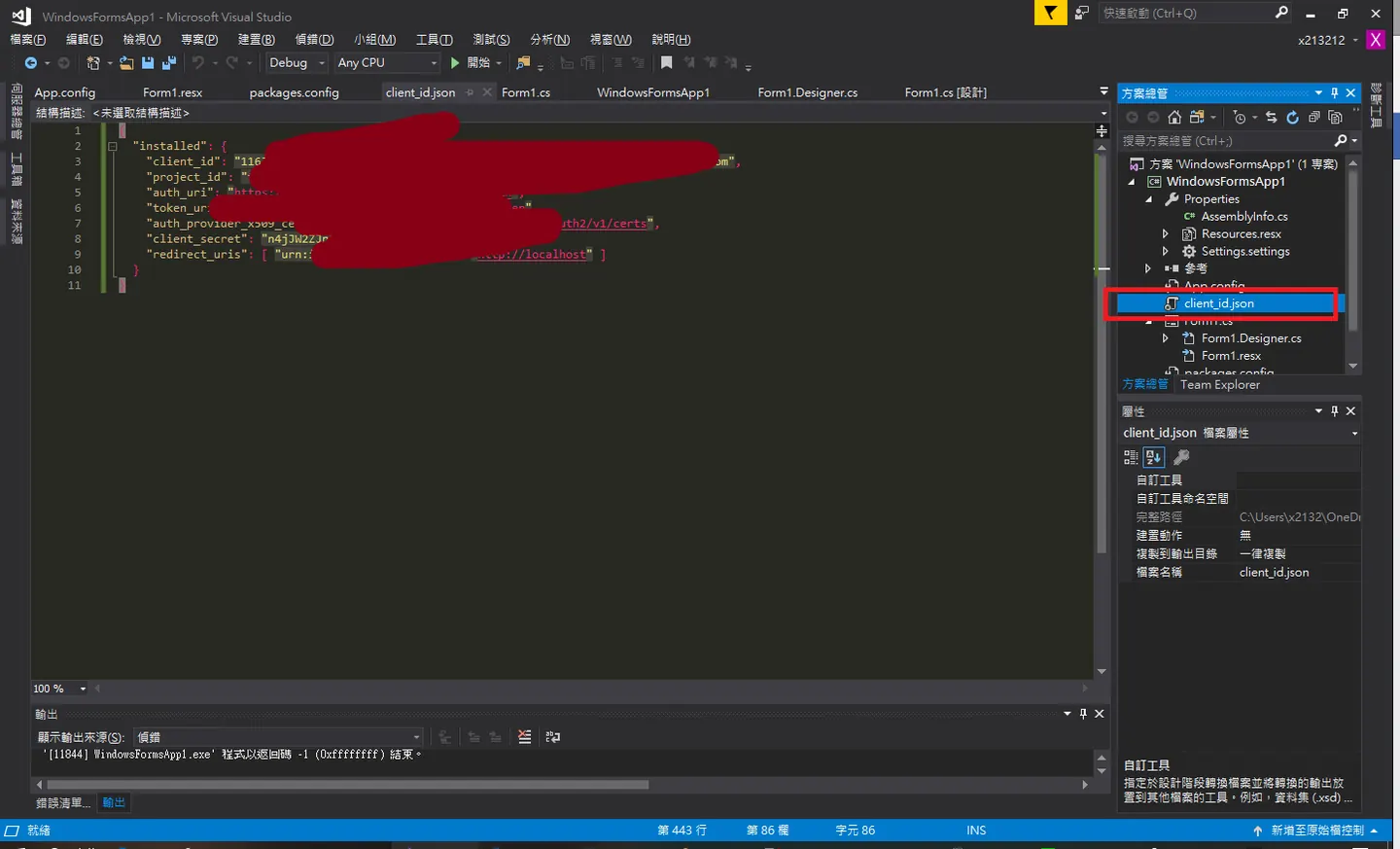 取名叫做client_id,一定要記得勾選一率複製重要!然後複製到目前的專案底下我們這邊放在參考這邊
可疑情況
0x1 redirect_uri_mismatch
ㄎㄎvisual studio 有一個位置重導向,這在開發asp.net也就是網路應用程式的話,每次你的visual studio 會動態的產生一組port,在asp.net的話呢可以把動態port設為false。
0x2 secret key 遺失
就是可能你授權出錯或是下載到錯誤的json檔解析錯誤這樣,我一開始選擇的是網路應用程式,debug好久呢~
Github
https://gist.github.com/x213212/340a324c25aee5b8df9513806ced0187
Create_folder.cs
    private static void Create_folder(string folder_name, DriveService service)
        {
            string pageToken = null;
            var fileMetadata = new Google.Apis.Drive.v3.Data.File()
            {
                Name = folder_name,
                MimeType = "application/vnd.google-apps.folder"
            };
            var request = service.Files.Create(fileMetadata);
            request.Fields = "id";
            var file = request.Execute();
            MessageBox.Show(file.Id);
            Console.WriteLine("Folder ID: " + file.Id);

        }
Download.cs
         private static void Download(string file_name, DriveService service,String savato)
        {
            var fileId = file_name;
            var request = service.Files.Get(fileId);
            var stream = new System.IO.MemoryStream();

            // Add a handler which will be notified on progress changes.
            // It will notify on each chunk download and when the
            // download is completed or failed.
            request.MediaDownloader.ProgressChanged +=
                (IDownloadProgress progress) =>
                {
                    switch (progress.Status)
                    {
                        case DownloadStatus.Downloading:
                            {
                                Console.WriteLine(progress.BytesDownloaded);
                                break;
                            }
                        case DownloadStatus.Completed:
                            {
                                Console.WriteLine("Download complete.");
                                MessageBox.Show("Download complete.");
                                SaveStream(stream, savato);
                                break;
                            }
                        case DownloadStatus.Failed:
                            {
                                Console.WriteLine("Download failed.");
                                MessageBox.Show("Download failed.");
                                break;
                            }
                    }
                };
            request.Download(stream);
        }


   private static void SaveStream(System.IO.MemoryStream stream, string saveTo)
        {
            using (System.IO.FileStream file = new System.IO.FileStream(saveTo, System.IO.FileMode.Create, System.IO.FileAccess.Write))
            {
                stream.WriteTo(file);
            }
        }
Form1.cs
            UserCredential credential;
            credential = GetCredentials();
            // Create Drive API service.
            var service = new DriveService(new BaseClientService.Initializer()
            {
                HttpClientInitializer = credential,
                ApplicationName = ApplicationName,
            });
          //UploadBasicImage("C:\\0110000010001.txt", service);
          // MessageBox.Show(Searach("Invoices", service));
          // UploadBasicData("C:\\0110000010001.txt", service, Searach("Invoices", service,0));
          //  Download(Searach("0110000010001.txt", service,1),service, "C:\\qwe.txt");
GetCredentials.cs
    private static UserCredential GetCredentials()
        {
            UserCredential credential;

            using (var stream = new FileStream("client_id.json", FileMode.Open, FileAccess.Read))
            {
                string credPath = System.Environment.GetFolderPath(System.Environment.SpecialFolder.Personal);

                credPath = Path.Combine(credPath, ".credentials/drive-dotnet-quickstart.json");

                credential = GoogleWebAuthorizationBroker.AuthorizeAsync(
                    GoogleClientSecrets.Load(stream).Secrets,
                    Scopes,
                    "user",
                    CancellationToken.None,
                    new FileDataStore(credPath, true)).Result;
                // Console.WriteLine("Credential file saved to: " + credPath);
            }

            return credential;
        }
Searach.cs
       private static String  Searach(string  file_name, DriveService service,int change)
        {
            FilesResource.ListRequest request = service.Files.List();
            //find folder
            if( change==0)
            request.Q = "mimeType = 'application/vnd.google-apps.folder' and name = '" + file_name + "'";
            else
            //find file
            request.Q = "mimeType = 'text/plain' and name = '" + file_name + "'";
            var folderId = request.Execute();    // Error occurs here upon execution
            List<string> File_Id = new List<string>();
            List<string> File_Name = new List<string>();
           // MessageBox.Show(request.Execute().Files.Count.ToString());
            for (int i = 0; i < folderId.Files.Count; i++)
            {
                File_Id.Add(folderId.Files[i].Id);
                File_Name.Add(folderId.Files[i].Name);
            }
            String find_id = null;
            for (int i = 0; i < folderId.Files.Count; i++)
            {
                if (File_Name[0] == file_name)
                    find_id = File_Id[0];

            }
            return find_id;

        }
UploadBasicData.cs
        private static void UploadBasicData(string path, DriveService service,string foloder_id)
        {
            var folderId = "0BwwA4oUTeiV1TGRPeTVjaWRDY1E";
            var fileMetadata = new Google.Apis.Drive.v3.Data.File();
            fileMetadata.Name = Path.GetFileName(path);
            fileMetadata.MimeType = "text/plain";
            fileMetadata.Parents = new List<string> { foloder_id };
            FilesResource.CreateMediaUpload request;
            using (var stream = new System.IO.FileStream(path, System.IO.FileMode.Open))
            {
                request = service.Files.Create(fileMetadata, stream, "image/jpeg");
                request.Fields = "id";
                request.Upload();
            }

            var file = request.ResponseBody;

            Console.WriteLine("File ID: " + file.Id);
            MessageBox.Show("ok");

        }
最後來小小抱怨一下
我的部落格阿,考杯剩下6X個文章嗚嗚
Comments